


Since switching to Universell, we’ve cut our admin time in half and boosted sales by 30% - all with one easy-to-use platform. It’s like having an entire team working behind the scenes for us.

Universell is currently unavailable in your region. Eligible companies, resellers, and partners can request access by reaching out to our team below.
Contact UsSince switching to Universell, we’ve cut our admin time in half and boosted sales by 30% - all with one easy-to-use platform. It’s like having an entire team working behind the scenes for us.
Owner of BrightPath Retail
Unlock Powerful Tools to Grow Your Business—Don’t Leave Just Yet!

Get the tools you need to streamline operations, boost sales, and grow your business effortlessly! Try it FREE today—no commitment required!
Don’t miss out—your competitors aren’t!
And you could be next!


All-in-one power : Close deals, track payments, and wow customers.
Zero risk : Try it free—no credit card, no hassle.
Time saved = Revenue earned : Automate 20+ hours of busywork monthly.

Exclusive offer First 50 sign-ups this week get premium onboarding FREE ($300 value)!
You're just one step away from simplifying your business operations and boosting your revenue effortlessly!


Automate & Grow : Manage pipeline, Payments & Sales in one easy-to-use dashboard.
Save Time & Money : Reduce manual tasks and focus on what truly matters.
Increase Conversions : Powerful tools to keep customers coming back.
Join thousands of businesses already scaling with Universell!
No risk—just results!
Join thousands of entrepreneurs using Universell to simplify operations, track sales, manage customers, and grow smarter — with 100+ integrated tools at your fingertips.
 CRM, Payments, Scheduling, Inventory, Marketing & More No tech team required — just results 30-Day Free Trial — no credit card needed
Join thousands of entrepreneurs using Universell to simplify operations, track sales, manage customers, and grow smarter — with 100+ integrated tools at your fingertips.
CRM, Payments, Scheduling, Inventory, Marketing & More No tech team required — just results 30-Day Free Trial — no credit card neededFrom tracking hours to scheduling, payroll prep, and team communication—Universell brings everything you need to manage employees into one smart dashboard.

See when team members clock in/out, edit entries, and export timesheets.

Automate calculations, manage 1099 records, and handle sales-based commissions (not a full payroll system).

Set availability, avoid double-booking, and sync with Google & Outlook.

Send messages, emails, or make calls directly within the system.

Upload, organize, and share important documents safely.

Spot top performers, track attendance, and filter reports by time range.
Bring your team, tools, and tasks together with Universell. Simplify employee management, reduce errors, and give yourself more time to focus on growth.
WordPress powers a significant portion of websites worldwide, thanks to its flexibility and a massive ecosystem of themes and plugins. With the Universell plugin, you can enhance your WordPress E-commerce experience. This powerful tool allows you to seamlessly integrate your existing WordPress site with Universell, providing a robust set of features to manage and grow your business efficiently.

From your WordPress dashboard, simply install and activate the Universell Plugin.
Enter your merchant email and password to link your existing Universell account. New to Universell? Sign up first, then return to connect your account.
Inventory, orders, and customer data automatically sync between WordPress and Universell, so you’ll never worry about mismatched information again.
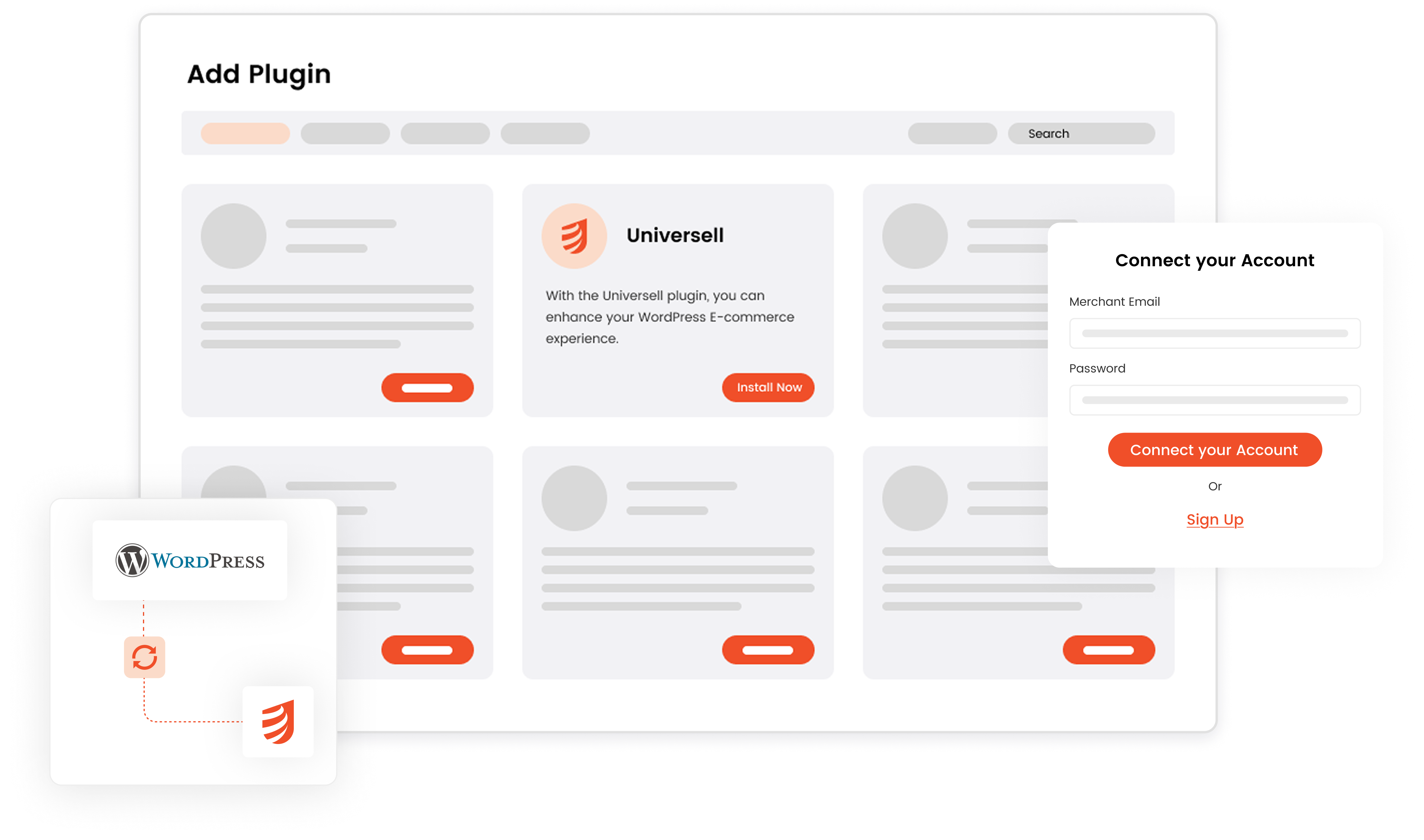
With the Universell Plugin for WordPress, you can unify store’s operations, reduce manual work, and focus on growing your business.
Bring your business online in minutes with Universell. Whether you want to showcase products, promote services, or create a complete website, our intuitive builder helps you do it all. No technical expertise required.
What you can do:

Understand how your pages are performing. Get insights into traffic, user engagement, and clicks so you can optimize for better results.

Anyone can build stunning pages with Universell. Drag, drop, and publish your site in no time with minimal effort.
Your pages automatically adapt to desktop, mobile, and tablet views, ensuring a smooth experience for every visitor.

Design a professional online presence that matches your brand. Highlight what matters most, from products and services to special offers.

Use engaging landing pages to spotlight your products. Capture attention, drive more sales, and turn visitors into customers.
Bring your ideas to life with Universell’s landing page and website creator. Create, launch, and track now all in one place.
Manage every step of your order journey without switching between systems. Universell brings together all your orders in one easy-to-use dashboard, so you can stay on top of sales, payments, and shipping seamlessly.
Quickly check the payment status for each order, whether paid, pending, or overdue, so you always know where your revenue stands.

Track shipments from dispatch to delivery and know the exact moment your customer receives their order.

Settle any unpaid orders directly from the order list with just a few clicks – saving time and avoiding delays.
Access every order from FastShop, Invoice, E-Sign Agreement, Pax, and other modules in one central dashboard. No need to juggle multiple tabs or tools.

Prepare items securely for delivery and choose whether to ship with or without a shipping label. Universell keeps the process simple while ensuring your products reach customers safely.
With Universell, order management and shipping become effortless, transparent, and reliable. Stay organized, deliver faster, and keep customers happy, all from one place.
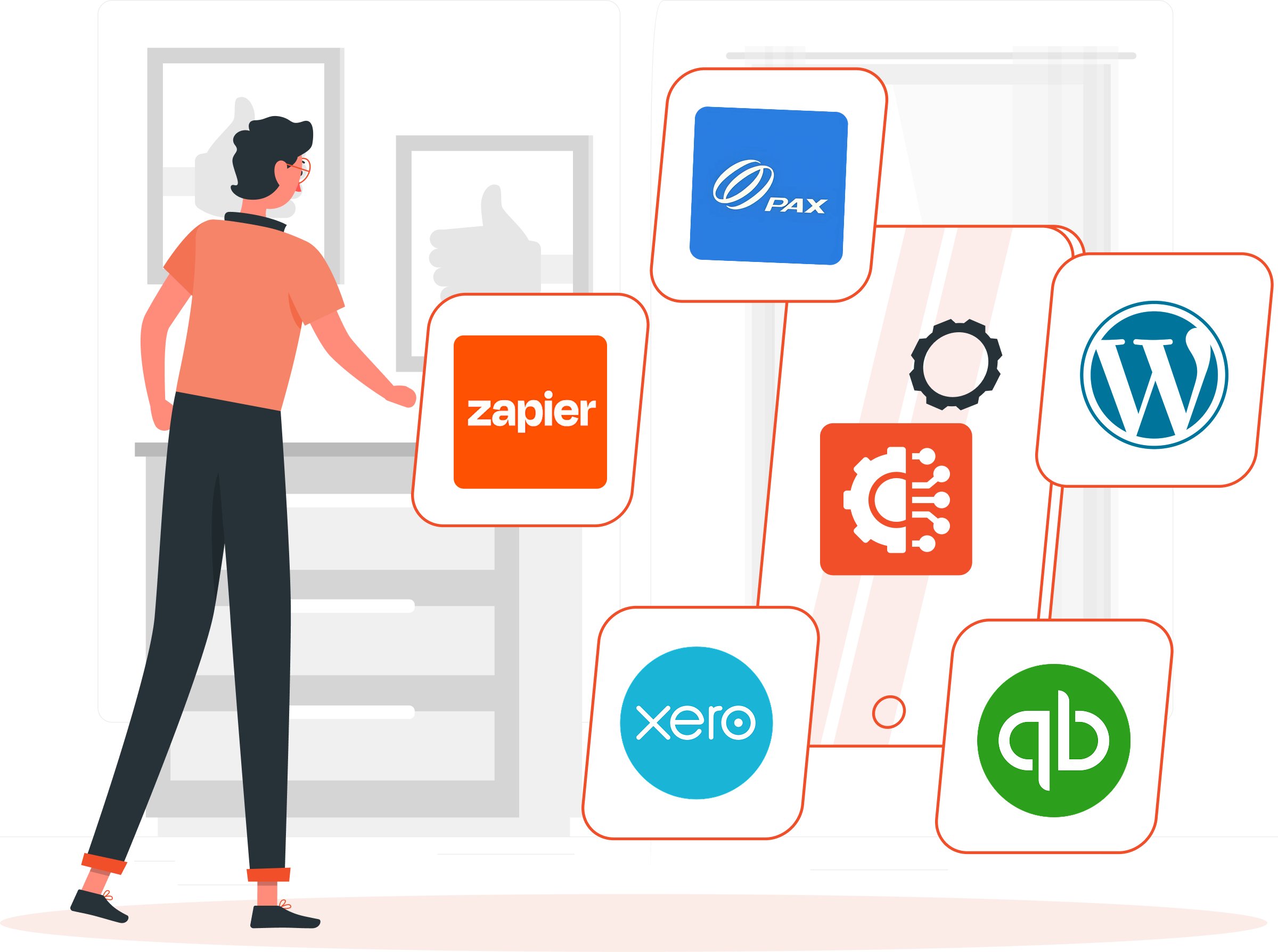
Universell makes it easy to run your business smoothly by syncing with the tools you already use. Manage everything from one place with customers, inventory, payments, and shipping all in sync. What you can do:
Understand your customers better and track sales performance in real time. Universell CRM Analytics gives you the insights you need to make smarter business decisions, improve customer relationships, and increase revenue. With CRM & Sales Analytics you can:
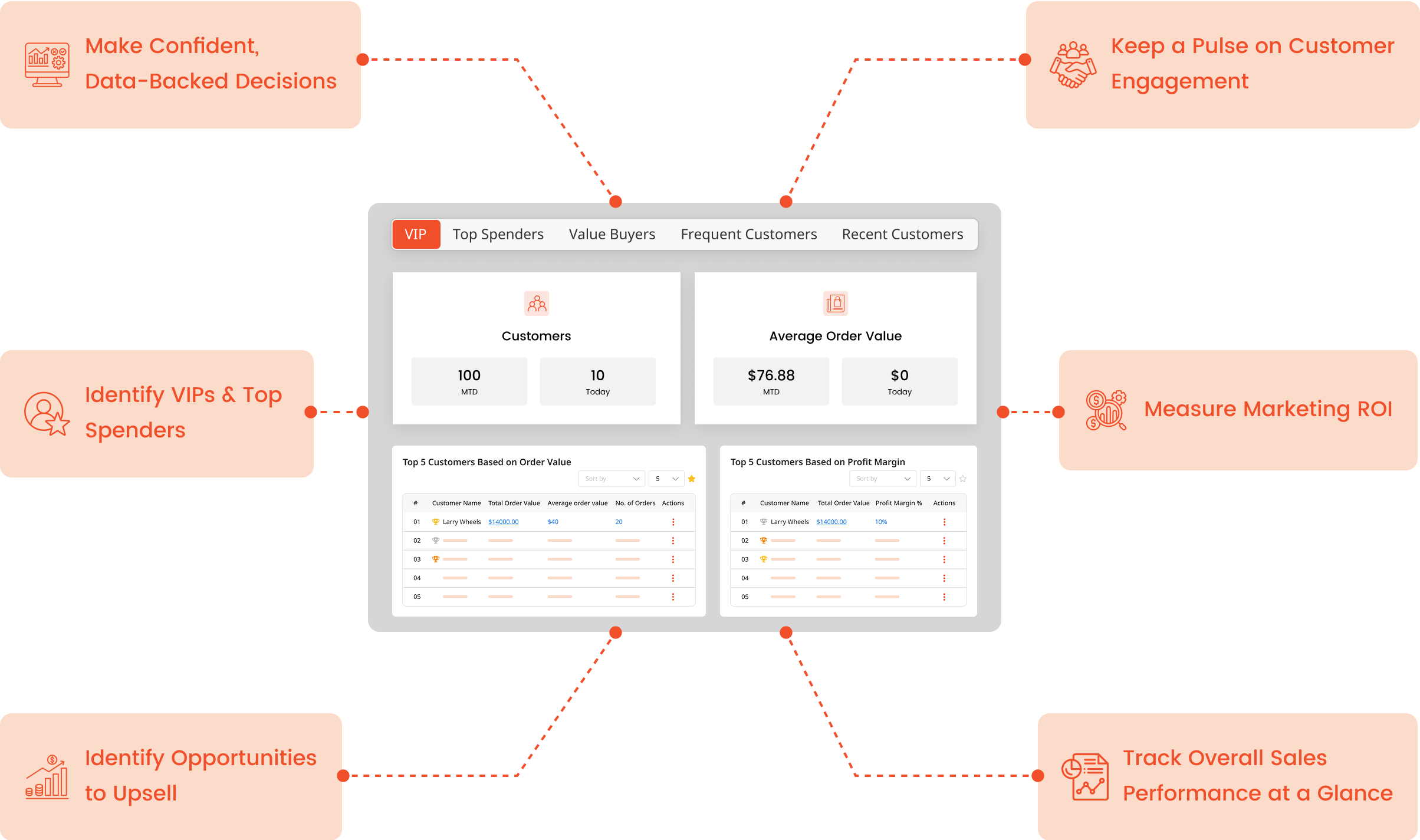
Make data-driven decisions today. Maximize your ROI and grow faster with Universell’s performance analytics.
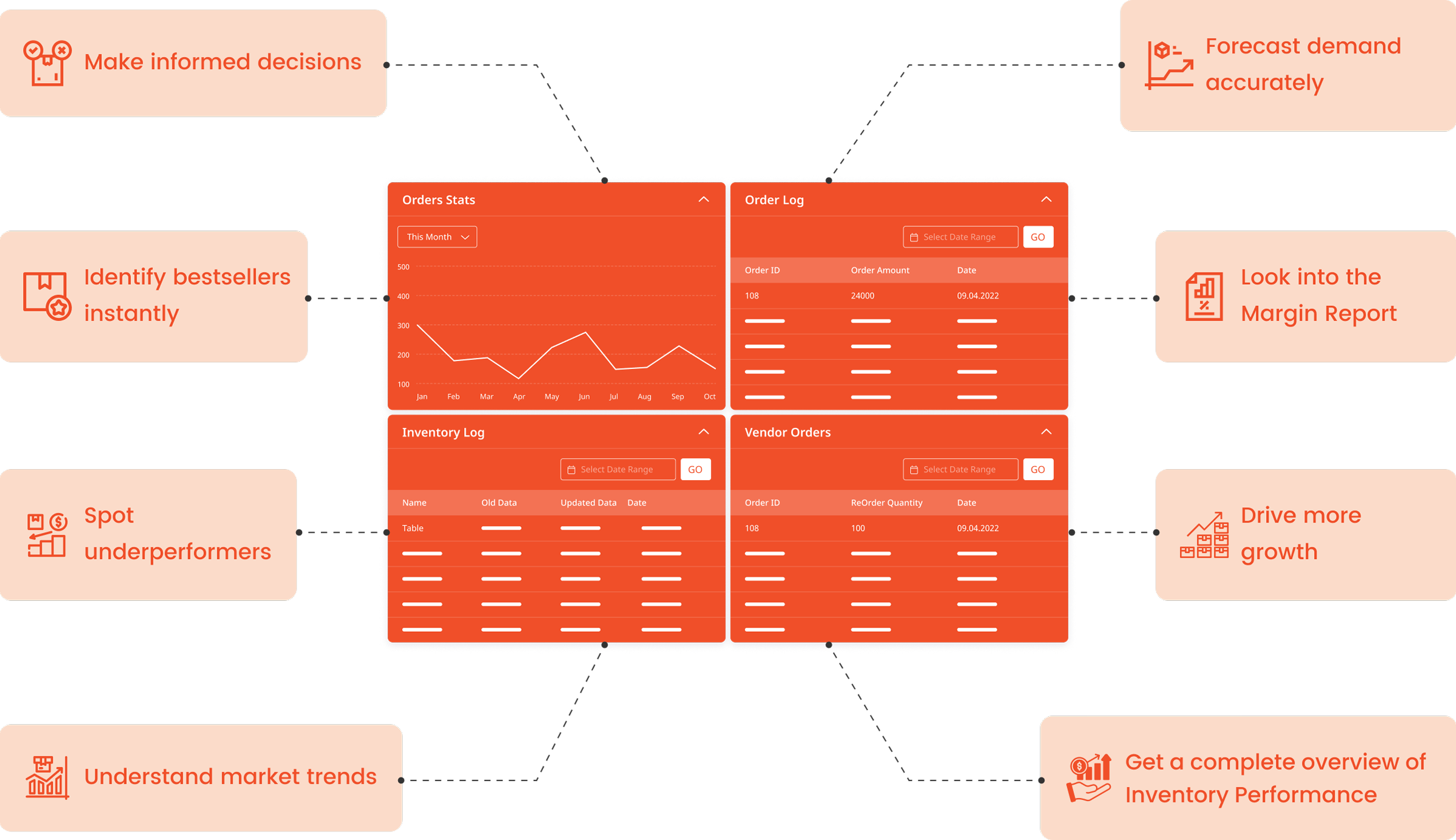
With Universell, you get access to powerful inventory analytics that help you make informed decisions. Instantly see which products are flying off the shelves and which ones need rethinking. Understand market trends, forecast demand, and get a complete overview of your inventory performance. Our Margin Report goes a step further by showing which items bring in the most profit, helping you focus on what really moves the needle for your business.
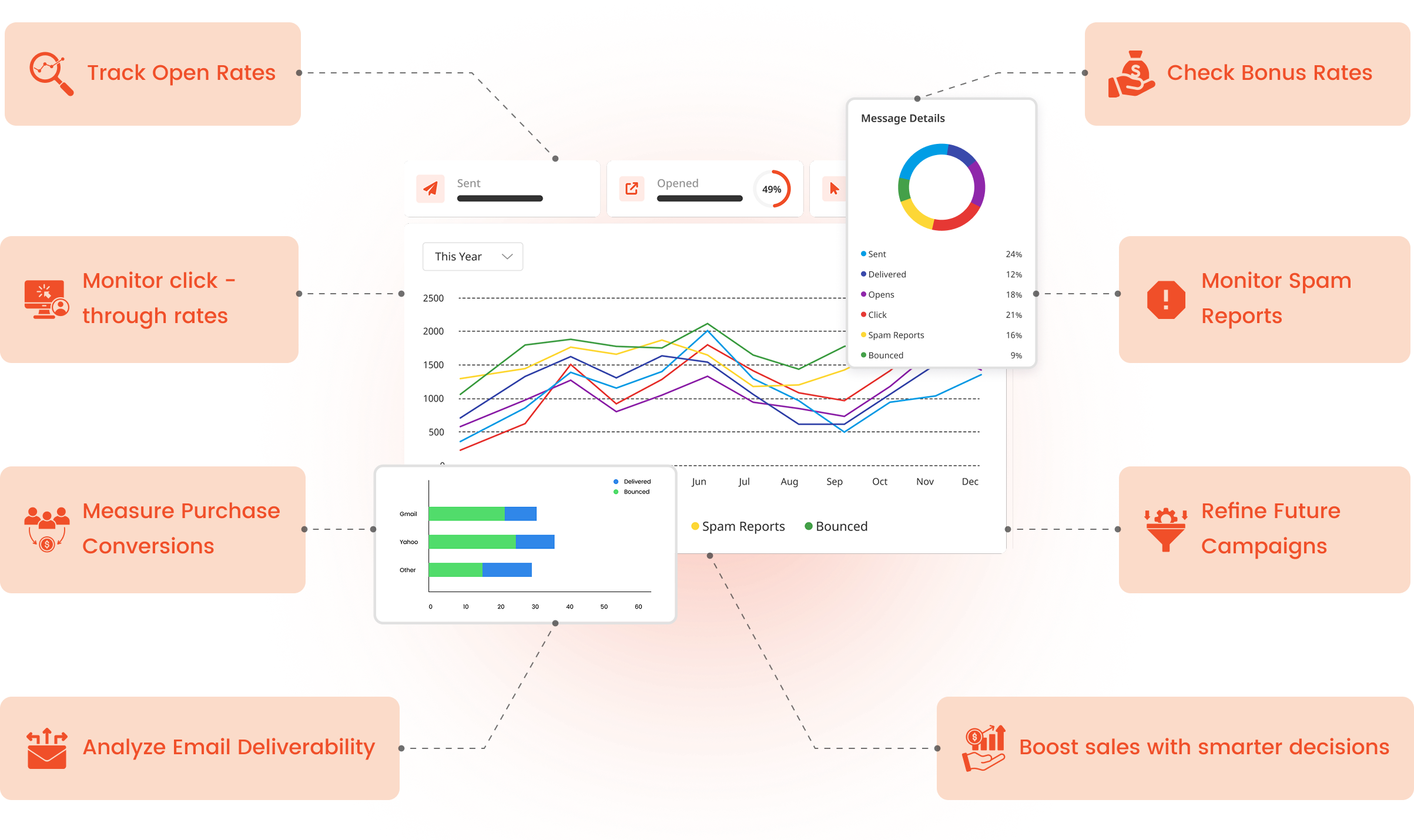
Understand how your campaigns are performing and turn data into decisions that drive growth. Universell’s real-time analytics give you a complete view of what’s working and where to improve. What you can track :
Make data-driven decisions today. Maximize your ROI and grow faster with Universell’s performance analytics.
End your day with complete clarity on how your business performed. Universell’s EOD Report gives you a quick, actionable summary so you can make better decisions for tomorrow. What you get in your daily report:
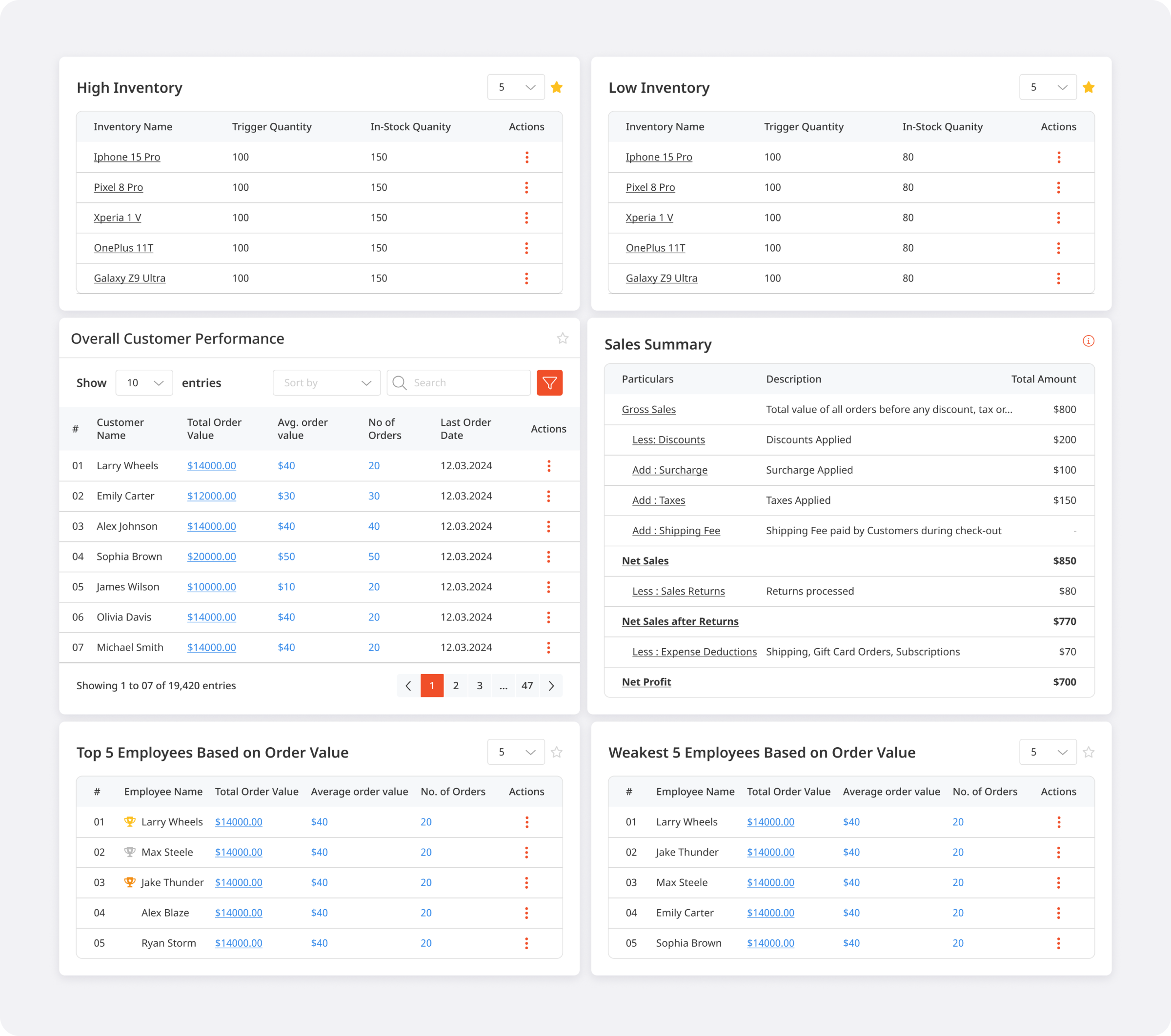
Start every new day with smarter insights. Get EOD reports delivered automatically and keep your business growth on track.
Hi, I'm Genie 👋 — let me help you set up your account instantly. Tell me about your business. Do you have a website?
Replies are generated by AI.
QUESTION 1 OF 3
Select your sub-type *
QUESTION 2 OF 3
Select all that apply
QUESTION 3 OF 3
Select all that apply
Pick an option to continue.

Track every prospect in a dedicated leads workspace with deal value, source, assigned rep, and creation date at a glance. Import leads in bulk or add them one at a time with + New Lead, then move qualified prospects into your customer database when they are ready.
Leads stay separate from your customer list so your team can focus on qualification and assignment without cluttering active accounts. Filter by period, employee, status, and segments to prioritize follow-up and keep pipeline hygiene tight.

Build dynamic customer segments and static groups to slice your database by behavior, lifecycle stage, source, or any custom criteria. Segments power bulk actions, filtered views, and smarter campaign targeting across CRM and marketing.
Use groups for account hierarchies, VIP lists, or regional rollups-then apply them everywhere customers appear, from the main customer table to analytics and automation triggers

Deploy embeddable Lead Catcher forms that capture name, contact details, and intent the moment a prospect submits on your site. Every submission lands directly in Universell as a new lead—no manual entry, no lost inquiries.
Configure multiple catchers for landing pages, campaigns, or partner sites. Submitted data syncs instantly with lead records and appears on the customer 360 profile under Lead Catcher history for full traceability.

Open CRM Analytics and Deal Analytics dashboards to see new deals, current pipeline value, won/lost counts, and forecasted revenue on one screen. Conversion charts show how opportunities move stage by stage so managers can spot bottlenecks before they cost revenue.
Drill into deal source distribution, won/lost analysis, and revenue by source to understand which channels deliver the highest-value opportunities. Use these insights to coach reps, adjust stages, and align sales and marketing spend with what actually closes.

Open any customer to see a full 360° profile: contact and business info, health score, reward points, segments, assigned employee, billing and shipping addresses, and more. Quick actions let reps call, SMS, email, add notes, create invoices, agreements, tickets, or appointments without leaving the record.
Profile tabs consolidate communication history, notes with @mentions, orders, agreements, active deals, metrics, tickets, submitted forms, uploaded files, and saved payment methods. Everything your team needs to serve the customer is in one place.

Set up CRM Automation rules that run when leads are created, deals change stage, tickets age, or customers hit a segment threshold. Trigger emails, SMS, task assignments, status updates, and internal notifications without manual intervention.
Reduce dropped balls and inconsistent follow-up by letting Universell enforce your playbooks. Automation works alongside segments, forms, and pipeline stages so growing teams scale outreach without scaling headcount.

Offer a dedicated Customer App where clients sign in to see their profile, orders, agreements, appointments, and support tickets. Reduce inbound calls by letting customers check status, update details, and interact with your business on their schedule.
The app connects to the same CRM data your team uses internally, so self-service actions and portal activity stay in sync with the customer 360 profile and communication log.

Publish Appointment Catcher forms on your website so prospects and customers book time without back-and-forth email. Availability rules and employee schedules control which slots appear, and confirmed bookings flow straight into My Calendar and the customer record.
Pair with employee scheduling to balance team capacity across locations or roles. Every booked appointment is tied to the contact in CRM for reminders, follow-up, and reporting.

Launch one-to-many SMS campaigns from your connected business numbers. The campaign dashboard shows schedule, recipient count, delivered and undelivered totals, and status—Completed or Active—at a glance.
Built-in SMS Policy & Best Practices keeps outreach compliant. Monitor credit usage and delivery rates, buy add-on credits when volume spikes, and pair campaigns with segments for targeted promotions, reminders, and re-engagement.

Run your business phone system inside Universell with inbound and outbound VoIP calling. The Call History dashboard shows total calls, missed calls, average duration, and completion rate—filterable by date range, category, and status (All, Missed, Ongoing).
Every log entry records who initiated the call, recipient, direction, duration, and status. Add notes inline and launch follow-up Call, SMS, or Email actions from any row without leaving the log.

Build a library of call scripts your reps can open during live conversations. Search, create, edit, delete, or pop out scripts in a three-pane layout—script list on the left, full script detail in the center.
Creator and last-updated audit trails keep scripts current as offers, policies, or talk tracks change. New hires sound like veterans from day one.

Enable or disable call forwarding per business phone number and choose where calls should land—another user, extension, or external line. Set scheduled forwarding with start and end dates, times, and day-of-week rules for after-hours or holiday coverage.
Use keep active until I turn off for open-ended forwarding, or time-box rules for temporary coverage when reps are out of office.

Purchase local or toll-free numbers by area code, state, or city—browse 2,700+ area codes and assign each number to users with role, email, and extension metadata. Four-digit extensions support fast internal transfers between people and departments.
Call Groups let departments share an extension and ring simultaneously—the first person to answer connects the caller. Optional schedules control when each group is active by date, time, and day of week.

Access voicemail without dialing into a separate system. Received and Sent tabs organize messages by direction, with search once you type three or more characters.
Add new contacts on the fly and keep voicemail alongside call history and SMS so nothing falls through the cracks.

Manage two-way SMS from a dedicated inbox with conversation search and threaded messaging. Pick your default sending number, open SMS Templates for reusable replies, and start new threads with + New Contact.
The Overview tab tracks credit usage, delivery rate, and phone number status so you always know capacity before peak campaigns or busy seasons.

Work from Inbox, Sent, and Scheduled tabs with a rich text composer—styles, images, tables, links, and HTML source editing. Schedule individual sends for a future date and time, separate from bulk marketing campaigns.
The sent log records customer, employee, template name, subject, SendGrid delivery source, and timestamp—with view and resend actions. System templates cover password resets, transaction confirmations, booking confirmations, and more.

Open the Documents workspace to draft proposals, SOPs, and customer-facing content in a multi-tab editor. A full rich text toolbar and HTML source view give you formatting control; Generate with AI speeds up first drafts.
Search the sidebar document list, work on several docs at once, and share or delete with per-document actions. Keep templates and knowledge base articles where your team already communicates.

Every customer 360 profile includes a Communication tab with a full history log filterable by date. Quick actions on the profile—Call, SMS, and Email—launch outreach without hunting for contact details.
Notes with @employee mentions (up to 32k characters) sit alongside the communication log so context from internal discussion and customer-facing messages stays in one record.

Administrators manage channel setup under Settings → Communication Settings. Configure email delivery, SMS providers, phone number inventory, and a unified communication history view.
Link purchased numbers to users, extensions, and call groups; review forwarding status; and keep telephony, messaging, and email policies aligned with how your business actually operates.

Browse inventory in Grid or List view with search, category filters, and toggles for sale items and promotional pricing. Tabs separate sellable inventory, services, internal/self-use, damaged, demo units, and soft-deleted items—each with its own workflow.
Every row shows SKU, quantity, price, in-store location, modifiers, and per-store stock. Quick actions cover price edits, commission setup, cloning, QR table-top prints, and channel visibility for POS, FastShop, and online store.

Add products without variant or with variant (size, color, material)—each variant gets its own SKU and independent stock. Use the AI-assisted description generator, rich text or PDF attachments, and image uploads to build complete product pages.
Configure opening stock across four buckets—For Sale, Damaged, Internal/Self Use, and Demo Units—plus sale pricing, taxes, discounts, vendor links, shipping details, and selling options for POS register, online store, FastShop, and Google.

Choose your import strategy: Reset & Import Fresh (replace all stock), Update Existing Stock (adjust quantities and add new items), or Import From Fresh (add new items only). A four-step wizard walks you through downloading the Universell template, preparing data offline, uploading `.xlsx`, and executing the import.
Column headers must match the template exactly—modified headers are rejected. Verify results in Manage Inventory after every run.

Create product categories with images, descriptions, and Show on FastShop visibility. Drag to reorder categories, then add subcategories under each parent with their own images and FastShop display settings.
Assign In-Store Locations (e.g., Shelf 20 Bin 50) so floor staff and count teams find items fast. Category and location filters power list views, counts, and reports across the module.

Build Modifier Groups and individual Modifiers for extras like toppings, packaging, or service add-ons. Modifiers adjust price at sale time without affecting stock—perfect for restaurants, retail customization, and service upsells.
Attach modifier groups to products on the Modifiers tab during add/edit. Customers choose options at POS or online; your catalog stays lean while checkout stays flexible.

Open the Adjust Stock modal from Manage Inventory to move quantity in or out for any item. Stock-In captures unit cost price; Stock-Out records reductions. Choose an adjustment reason and add remarks for audit clarity.
Every adjustment logs to the Inventory Log instantly. The system supports negative for-sale quantities when your workflow requires it.

Start a count with Scan & Count (barcode/SKU one-by-one on the floor) or View List & Update Count (bulk entry by category and location). Track progress across sellable, damaged, demo, and internal buckets per item.
Counts move through In Review and Counted tabs. Review mismatches, print or download PDF/CSV reports, and share results with managers before finalizing.

Set minimum and maximum quantity thresholds per product with email and phone recipients. When stock crosses a boundary, Universell fires alerts so you reorder before a stockout—or flag overstock before cash gets tied up.
Low and High Inventory Alert reports show trigger quantity, trigger date, and category context. Link alerts to vendors for faster procurement follow-up.
The Inventory Log records every stock change—transaction type, quantity in/out, running stock in hand, remarks, and who updated it. Filter by date, item, category, customer, or vendor; export for reconciliation and compliance.
Drill into any entry to view the linked invoice, count session, or adjustment. Negative balances display when applicable so nothing is hidden from auditors.
Download the Inventory Count App for Android and sign in with your Universell credentials. Manage categories, modifiers, and variants on the device with real-time Wi-Fi sync to the web dashboard.
Scan barcodes on the sales floor, update counts without a desktop, and request one-on-one training from inside the app. Changes sync bidirectionally with Clover POS and your integrated website when connected.

Filter analytics by Fixed, Variable With Tracking, or Variable Without Tracking inventory. KPI cards cover vendors, purchase orders, reorders, imports, received stock, damaged items, sale pricing, and alert counts.
Switch between chart and grid views for top products, top categories, and weakest performers. Open Margin Report, Sales Analysis, Profit Analysis, and Inventory Summary tables showing total value, potential revenue, profit margin %, and quantity in stock—with print and download export.

Create purchase orders one vendor at a time—add line items with cost, reorder qty, and place order. Or use Manually Add Stock to receive items from multiple vendors without a PO.
Tabs track Open Purchase Order, Purchase Order Received, and Inventory Received with variance columns for difference, damage qty, and tester qty. Receive inventory during the flow or add new products on the fly.

Connect stores by Merchant ID or email, then approve inbound and outbound connection requests. Connected partners sync inventory, customers, rewards, coupons, gift cards, and stock transfer eligibility.
Manage active connections, pending requests, and cancelled partnerships from one screen. Mutual approval is required before sync begins—review each request before accepting.

Start a transfer from your current store to any connected destination. Search products, see available quantity at source, and enter transfer qty—over-transfer is blocked when stock is insufficient.
Both stores update automatically: source gets Stock-Out, destination gets Stock-In. Add notes for restocking reasons or seasonal balancing; every transfer logs to the Inventory Log.

Build a vendor list with company name, contacts, email, phone, lifetime purchase value, and total received quantity. Upload vendor documents (PDF, Office formats) and track 1099-related fields for accounting.
Jump to Reorder from any vendor row. Toggle vendor status on/off without losing history.

Open a vendor's Product Reorder tab to see qty on hand, suggested reorder qty, unit cost, and line totals. Select items in bulk, then download, print, share, or Place Order to generate a purchase order.
Purchase Orders and Order History tabs track PO amounts, receipt variance, damage qty, and differences over time—so procurement stays tied to what actually arrived.

Create Inventory Automation rules with trigger name, inventory event, notify targets (customer, employee, merchant, or external source), and linked SMS and email templates. Preview templates before save, then set scheduling or recurrence in step two.
Alert the right people when stock runs low, shipments arrive, or custom inventory triggers fire—without manual follow-up from your ops team.
The Add Employee wizard walks through seven steps: basic information, access authorizations, confidential data,
wages, commission, file uploads, and login access with working hours. Capture gender, position, role, PIN, emergency
contacts, SSN, tax ID, 1099 tracking, and pay rate (hourly or salary) in one flow.
Edit Employee adds an Agreements step for job responsibility, skills, description, and notes—plus top actions to
reset password, log in as employee, chat, or mail. Upload documents and images with type constraints; restrict login by
timezone, weekday, and time slot, with an option to allow access outside working hours.

Assign roles and fine-tune permissions with a View / Create / Edit / Delete matrix per module—Customer, CRM Automation, Leads, Pipeline, Customer Segment, Lead Catcher, Custom Forms, and more. Use Manage Role to define templates, then apply them during add or edit employee.
New hires get the right access on day one; role changes propagate without rebuilding accounts from scratch. Permissions align with Universell's sidebar modules so security matches how your business actually operates.
Choose Basic Import to download a sample CSV/XLSX with essential fields—keep column order, leave optional fields blank, and upload. Best for fast, minimal onboarding when data is already clean.
AI Import uploads your file, validates entries, auto-corrects where possible, and lets you review results before final import. Both modes include an import guide video so HR and ops can self-serve without IT tickets.

Open Payroll Report, pick an employee and date range, and switch tabs: Wages (regular and overtime hours,
rates, gross pay), Order Commission, Volume Commission, Inventory Commission,
Deductions, and Payments.
A right-side summary card rolls up wages, each commission type,
deductions, and total due as of the report date. One workspace
replaces scattered spreadsheets when it's time to pay the team.

Configure Bonus Commission Levels per employee—or Copy to All Employee to roll out a plan company-wide.
Accordion sections cover Daily Sales, Weekly Sales, Monthly Sales, and Order thresholds,
each with amount brackets and extra commission percentages.
Universell credits commissions on schedule: daily after 11:30 PM, weekly on Monday night, monthly on the last day, and
order commission instantly when the sale posts. Tie pay directly to performance without manual calculation.

Generate 1099 Report tables with date, employee name, business ID, amount, and row actions. Export to PDF
or Excel for accounting and year-end filing.
Pair with confidential employee fields—business tax ID and Track Payment for 1099—so contractor classification
and payment history stay aligned in one system.

The Employee dashboard tab surfaces headcount, new hires, clock activity, imports, volume commission, appointments, payouts, and performer rankings. Top 5 and weakest 5 cards by order value help managers coach reps and recognize wins.
Drill from summary KPIs into payroll, commission history, and order logs on each employee profile—performance data connects to pay, scheduling, and CRM assignment in one platform.
Employee Log and history tabs consolidate Employee Log, Communication History, Note History, Order Log, Commission, Wages, Documents & Images, and Metrics. Filter by date and search within tables to answer "who changed what and when."
Support disputes, compliance reviews, and manager check-ins without exporting to external tools. Every tab mirrors data your team already creates in sales, CRM, and payroll.

Build schedules from the Schedule list—employee name, schedule date, timezone, start/end time, and interval (e.g.,
15 or 20 minutes). Use Quick Add or + Employee Schedule to create availability; edit or delete from
row actions.
Availability Schedule Detail shows generated slots (ID, employee, date, timezone,
start/end, interval). The Add Employee Schedule wizard covers date range,
weekdays, slot length, employee assignment, meeting provider URL, ad pixel
tracking, and share/preview steps.

Share Schedule Link sends your calendar via SMS, email, or copied link—or embed a Schedule Catcher on your
site with preview, copy code, and send-email actions. Customers see a branded flow: pick a date, choose
a time slot, and receive automatic confirmation.
Paste catcher code on websites or social profiles so prospects book without phone tag. Employee-specific
and company-wide calendar embeds connect to Scheduled Appointments and CRM calendars

Scheduled Appointments lists ID, employee schedule, calling context, employee ID, customer name, phone, email,
notes, status, and actions. Track active bookings and manage the pipeline from schedule catcher, appointment catcher, or
internal booking flows.
Every appointment links back to the customer record and employee schedule so reminders, follow-up, and revenue
attribution stay accurate.

Create folders, upload files or whole folders, and browse a tile-based library with search and reset. Supported content includes PDFs, videos, and office documents—with storage usage shown (e.g., MB used of total quota).
Trash, alphabetical sort, and per-file download/view actions keep HR and compliance paperwork centralized. Pair with employee file uploads on the profile for a complete document trail.

Learning Hub organizes Forms, Templates, and Archived content. Create E-Learning templates
(interactive courses with graded testing after video completion) or Quiz,
Test & Scoring templates with a point-based grading system.
The test/survey designer offers a rich element palette—logo, agreement,
e-signature, header, lead catcher, learning video, payment, and
more—with rename, share, and preview. Publish Anonymous,
Customer Targeted, or Customer Group Targeted forms;
end users see video players, required fields,
and submit flows with points tracking.
Team Messenger in the Employees mega-menu connects to Universell Communications—direct messages, channels,
threads, shared files, and voice/video calls. Managers reach field staff from the employee list via Chat
and Mail actions on edit employee.
Internal collaboration stays inside the same login as CRM, sales, and scheduling—no extra Slack
or Teams subscription required for day-to-day coordination.
Create Employee Automation rules from Marketing → Automation: define trigger name, trigger event, time frame, SMS template, and email template. The list tracks ID, created date, and actions for each rule.
Automate onboarding reminders, schedule change alerts, certification due dates, and internal notifications—same wizard pattern as CRM and Sales Automation so ops teams configure once and reuse everywhere.

Open Apps & Integrations from Employee Management to access the Chat App, Inventory Count App, and
Customer App—each with platform badges for mobile distribution. Request Training
schedules onboarding for your team on the apps they use in the field.
Inventory Count syncs with the web dashboard and Clover POS; Customer App ties
to CRM and rewards. Centralized app discovery keeps mobile and tablet workflows
visible to every manager.

Use Make a Sale in the global header to start a transaction without navigating away from your current work. Enter an amount and go—ideal for fast counter sales, deposits, or walk-in payments when speed matters.
The shortcut connects to the same payment engine as the Virtual Terminal, so tax, discounts, customer assignment, and receipt handling stay consistent across every sale channel.
Activate PrimeGateway Customer Vault to save payment methods customers authorize for future use. Saved cards appear on the customer 360 profile and at checkout—virtual terminal, invoices, jobs, and recurring plans.
Reduce friction for repeat buyers and subscription customers while keeping sensitive card data handled through your payment gateway—not scattered across spreadsheets or sticky notes.

Build single or recurring invoices with line items, service dates, SKU, modifiers, attachments, and customizable messages. Choose from 10 branded templates, preview before send, and offer partial payments so customers pay what they can now and the balance later.
Invoice settings cover Bill Pay Portal access, automated reminders, early-payment discounts, SMS alerts, and chargeback-reduction emails. Row actions let you send statements, reassign employees, convert to jobs, link to existing jobs, or collect payment in one click.

Create estimates with the same detail as invoices—primary contact info, job address, start/end times, line items, terms, messages, and attachments. Send for customer approval and track status from Open to Converted to Invoice.
When the customer pays, Universell tracks balance, refunds, and payment history through the conversion. Link estimates to jobs so field work and billing stay aligned from first quote to final payment.

Set up recurring sales in a three-step wizard: select customer and amount, choose interval and end rules (no end date, end date, or fixed number of occurrences), then enter payment details. Auto-generated orders bill on schedule—view, pause, or stop any plan from the Recurring Payments list.
Filter by date, payment method, customer, employee, frequency, and amount. View Failed Transactions surfaces decline reasons and occurrence numbers so you can recover revenue before churn sets in.

Manage signature workflows from draft through signed. Status tabs—Draft, Sent, Signed, Deleted, Voided, and Templates—keep every envelope organized. Upload a PDF, add recipients, place signature fields, and monitor progress bars showing who still needs to sign.
E-Sign integrates with agreements and sales documents so contracts close faster without printing, scanning, or chasing paper.

Create one-time or ongoing service agreements in a two-step wizard: add details, then preview and send. Choose payment terms, e-sign expiry, verification options (snapshot, photo ID, sign without payment), and optional ticket creation with assignment.
Rich work descriptions, service/price tables, and template merge fields produce polished agreements. Signed agreements sync to the customer profile alongside deals, orders, and support history.
Build booking forms in three steps: describe your form, choose services with pricing and duration toggles, then assign employees and review a live customer preview. Offer instant confirmation or approval-required bookings, with or without upfront payment.
Share via embed code, direct link, email, SMS, QR code, or social apps. Customize email templates for confirmed, received, and status-updated bookings—and add Meta Pixel, Google Tag Manager, or custom tracking pixels to measure conversions.

The Job Dashboard shows active and archived jobs with customer, employee, source, date/time, status, and total amount. Jobs auto-populate when you convert invoices, estimates, or agreements—schedule with employee availability, title, and address from a calendar picker.
Collect payments in-job via card, ACH, or cash. Aggregate unpaid invoices, estimates, and agreements on one job, save cards to the customer profile, and update job status inline as work progresses.

Open the Route Dashboard, pick a date and employee, and see every stop plotted on an interactive map with numbered markers. Review stop counts per rep and toggle show selected route on map to plan efficient drive order.
Edit routes per employee so technicians spend less time driving and more time delivering service—especially valuable for mobile businesses with multiple appointments per day.

The order list supports scan-by-SKU, import, Bill Pay Portal access, and deep filters—payment method, delivery method, employee, status, order type, source, and amount range. Quick date presets (Today, Yesterday, Last 7 Days) speed up daily reconciliation.
Columns cover order ID, QuickBooks invoice number, customer, amount, status, type, shipment type, and notes. Manage upcoming recurring orders and jump to order management tools without leaving the sales workflow.

Build and manage payment forms from the Sales mega-menu—list existing forms, add new ones, and share embeddable checkout experiences that connect to your payment gateway. Customers pay without calling or visiting in person.
Payment Catcher submissions flow into Universell as orders, keeping web payments alongside terminal, invoice, and booking revenue in one reporting view.

Set up event ticketing forms to sell admission, registrations, or seat-based access online. Ticket payments appear as Event Ticket Payment orders in analytics and order lists alongside invoices, bookings, and terminal sales.
Pair with email confirmations and customer records so attendees, purchasers, and refund requests are easy to find after the event.
The Order Analytics dashboard filters by agreement, invoice, recurring invoice, estimate, job, Fast Shop, booking, event ticket, pre-auth sale, and more. KPI cards compare number of orders, users, items ordered, and average order value against the previous period.
Charts show revenue vs order count by week, orders placed vs shipped, and sales by customer country—so leadership sees what is selling, where, and whether fulfillment keeps pace with demand.
Create Sales Automation rules with the same wizard pattern as CRM Automation: pick a trigger event, choose who to notify (customer, employee, merchant, or external source), attach SMS and email templates, then set scheduling or recurrence.
Automate payment reminders, post-purchase follow-ups, failed payment alerts, and internal handoffs so routine sales communication runs on autopilot.

Change the Fast Shop logo, upload or select banners from the library, add scrolling header/footer banner messages, and choose a storefront template from the theme gallery. Product positioning lets merchants reorder cards on selected pages, while category and subcategory managers control images, display order, and Fast Shop visibility.
Store Appearance settings cover theme colors, button colors, link/highlight colors, product borders, product card backgrounds, thumbnail backgrounds, font family, font size, and text colors. This gives non-technical users control over the shopping experience without code.
The Fast Shop Share modal generates a public shop link, copy action, and QR code. Merchants can distribute the
store via email, SMS/chat, Facebook, X, Instagram, printed QR, or copied QR.
This makes Fast Shop useful for in-store signage, social promotion, text campaigns, and direct customer
follow-up from the same admin console.
Fast Shop settings include abandoned cart tracking, quick checkout, custom product requests, disabled add-to-cart rules, and out-of-stock ordering behavior. Abandoned carts are marked after one unpaid hour, and matching email/phone/amount can update existing checkout records instead of creating duplicates.
Quick Checkout lets customers complete purchases without leaving the product/listing page. Disable Add to Cart can target categories, subcategories, or specific products. Out-of-stock ordering can be allowed while Universell preserves inventory accuracy through automatic stock-in and stock-out adjustments.
Domain Setup supports associating an existing domain, purchasing through Mydomainx.com, or using the built-in shareable Fast Shop URL. SEO Settings include page title, permalink, description, meta keywords, header code, footer code, and a hide-from-search-engines option.
Google Analytics guidance is built into setup, making it easier to connect tracking without leaving the admin flow. Header/footer code fields also support conversion pixels and site verification scripts.
The public storefront includes logo, Home/FAQ navigation, search, Login, cart, category tabs, sort controls, filters for category, price, color, name, and size, and products-per-page selection. Product cards show images, item names, variant metadata, price, quantity controls, and Add to Cart.
Product detail pages include image gallery, breadcrumb, title, category/subtitle, star rating, reviews link, price, color swatches, size selector, quantity controls, availability, Add to Cart, Buy Now, Share, and shipping messages.
Guest checkout captures first name, last name, email, phone, billing address, country/state/city/zip, shipping address, cart, and order summary. Logged-in customers see prefilled profile data, editable addresses, rewards redemption slider, available points, legal/consent language, and saved customer context.
Checkout includes Local Delivery and Web Shipping options, card and gift-card payment tabs, coupon application, authorization checkbox, and Proceed to Payment. Completed orders show product totals, tax, shipping, billing/payment status, shipping/fulfillment status, tracking history, printable receipt, and download actions.
Logged-in shoppers get a customer dropdown with Orders, Profile, and Logout. The My Orders page
supports start/end date filters, fulfillment status, table search, receipt actions, and footer
links for Home, Order List, Profile, Contact Us, FAQ, Privacy Policy, Terms, Return/Refund
Policy, Shipping Policy, and Payment Policy.
This self-service layer reduces support calls and keeps customer-facing order status aligned
with Universell's internal sales and fulfillment records.
WordPress Integrated Site connects an existing WordPress storefront to Universell so customers, inventory, and orders sync in real time. Merchants can manage sales, leads, and marketing from one dashboard while keeping their existing website presence.
The screen includes View Plugin in Wordpress and a service option for a professionally designed WordPress site integrated with CRM, lead forms, and booking tools.
The Landing Pages module includes Generate New and View Existing Landing Pages tabs. The AI studio collects business name, tagline, description, email, phone, address, optional Business Q&A, reference websites, and logo preference before moving into guided design questions.
AI can generate business descriptions, taglines, and page-specific logos. The guided assistant asks about website inspiration, logo choice, color palette, font pairing, and page type, including Product Launch, Lead Generation, Event/Webinar, Portfolio, Service Showcase, and Coming Soon.
After generation, the page opens in a drag-and-drop designer with Go Back, editable page name, Preview, Save As Landing Page, and Save As Template. The AI Chat Editor can refine copy, sections, and structure, while the right panel exposes Elements, Properties, and Layers.
Elements include layout blocks, text, link, image, video, map, quote, form, input, textarea, select, button, label, checkbox, and radio. Settings cover landing page name, keyword, thumbnail, and domain connection. Share supports social channels, link copy, QR code, email, SMS, and print code.
Existing Landing Pages shows summary metrics for pages live, total views, leads captured, and average conversion. Filter by All, Live, or Draft; search pages; open Archived; select templates; or create a new page.
Each card includes thumbnail, page name, industry/category tags, connection status, updated date, and Live badge. Lead capture and conversion metrics activate after lead forms are selected or added.
Ecommerce Automation sits alongside CRM, Sales, Inventory, Employee, and Marketing automation modules. Use it for post-purchase follow-up, abandoned checkout reminders, product interest campaigns, order status messaging, and internal handoffs tied to Fast Shop and web activity.
The automation model follows Universell's trigger/template/scheduling pattern, so merchants can reuse SMS and email templates across web, CRM, and sales workflows.

The Rewards Dashboard shows loyalty performance with date filters and KPI cards for Points Redeemed, Amount
Spent as Reward, Customers Enrolled, and Points Awarded. Manage reward programs from one
screen: First Time, Refer A Friend, Birthday, Comeback, and Punch Card Rewards all
appear as enabled reward cards.
Global settings include Setup Rewards, Auto Reminder settings, Rewards Transaction
templates, Rewards Flyer template, Import Rewards, and Rewards Redemption Time Slots.
Recent redeemed/awarded transactions are searchable by customer, points, date, and
actions.
Setup Rewards lets merchants define the core loyalty conversion: how much spend earns how many points, how many points convert into account credit, and when points expire. A summary panel clearly shows both earning and redemption rules.
When reward rules change, Universell warns if customers have not been notified. Use Save and Notify Customers or Save, and update notification email/SMS templates from the same screen.
Rewards Transaction Templates manage both Rewards Received and Rewards Redeemed notifications with email previews and SMS phone previews. SMS templates include character counters, live mobile preview, and merge fields such as `{{reward points}}` and `{{Retail Business Name}}`.
The Rewards Flyer Template uses a drag-and-drop visual editor with blocks for text, images, links, forms, buttons, and layout. Flyers can be emailed, downloaded, or printed for in-store loyalty promotion.
Import Rewards walks users through downloading a sample CSV, editing the correct columns, uploading CSV/Excel, and importing. This supports migration or bulk loyalty adjustments without manual point entry.
Rewards Redemption Time Slots let merchants enable redemption windows by day, start time, and end time. Each row has an enabled toggle and action controls so businesses can limit point redemption to approved hours.
First Time Rewards includes campaign metrics, enable/disable control, first-time reward points, validity period in days, and poster preview with Customize and Download. Share the reward via email or SMS and update both templates.
Award points manually to selected customers or groups, preview email/SMS, and send. Reminder screens target customers who earned rewards but have not used them, with customizable email and SMS templates including AI-assisted SMS generation.
Punch Card Rewards supports rule-based rewards such as “after 2 purchases, free product” or “after 10 purchases, receive $5.” Each rule can be enabled or deleted, and campaigns can be advertised to selected customers or groups.
The dashboard tracks points awarded and customers enrolled. Reminder flows identify customers who have not made purchases after receiving rewards, with email/SMS previews, template editors, and send email/message modals.
Comeback Rewards target customers based on days since last purchase. Set reward points, inactivity threshold, validity period, enable the campaign, then send targeted offers to selected inactive customers.
Reminder workflows show customers who earned comeback rewards but have not used them. Email and SMS templates include “We Miss You” messaging, preview screens, rich editors, AI SMS generation, and send modals.
Birthday Rewards define points awarded on birthday, validity period, and how many days before the birthday rewards should be awarded. The dashboard includes campaign metrics, poster preview, Customize/Download, and Enable Campaign controls.
Send reminders to customers with birthday rewards, update birthday email and SMS templates, and send direct email or message campaigns to selected customers or groups.

Refer A Friend lets merchants set points for the referrer, points for the friend, monthly referral limits, validity period, and campaign status. Share through email/SMS and use the poster preview for in-store or digital promotion.
Advertise referral rewards to customers/groups, send reminders, and customize Rewards Earned and Rewards Received templates with merge fields for customer name, referred name, points, and business name.
Product Promotion creates product-wise campaigns through a three-step wizard: campaign details, template customization, and promote campaign. Fields include campaign name, public title, start/end dates, discount percentage, sale days, selected item, inventory, terms, description, and external website link.
The campaign template builder includes drag-and-drop blocks, product artwork, sale dates, discount, Shop Now/Visit Store CTAs, and contact details. Promote campaigns with shareable links, QR codes, email/social/messaging icons, transactions, customer views, and copy-and-create actions.
Store Promotion applies a campaign to the entire store with fields for campaign name, public title, description, terms, start/end dates, discount, and sale days. The wizard includes campaign details, template customization, and customer/group selection.
Audience controls support all customers, individual customers, groups, and segments. Campaign lists include upcoming and past tabs, edit/copy/delete actions, preview modal, delete confirmation, detailed campaign columns, and current campaign views.
Coupon List shows coupon code, start/end date, promo value, created date, status toggle, and actions. Add or edit coupons with name, all-inventory toggle, category, subcategory, inventory, discount, start date, expiration date, sale price days, and QR code.
Row actions include Clone Coupon and Coupon Logs. Logs track who changed coupon data, old values, updated values, and timestamps for auditability.

Coupon Campaigns support campaign lists, status toggles, logs, transactions, reports, edit, copy, and campaign report actions. Campaigns can use small-scale templates or large-scale enterprise templates.
The wizard covers template choice, campaign details, audience, and scheduling/recurring rules. Define coupon code, dates, email template, subject, message, tags, header/footer display, customers or leads, groups, bounced emails, Send Now, scheduled delivery, recurring intervals, and ending rules.
Email Campaigns list campaign name, recurring state, scheduled state, email sent, created date, status, and actions. Row
actions include edit, copy, campaign log, transactions, report, and side-panel preview.
Campaign creation supports Small-Scale Announcements, For CRM Users, and Large-scale Marketing.
Small-scale campaigns use standard templates and messages; CRM-user campaigns use CRM email
templates; enterprise campaigns use a template gallery, drag-and-drop customization, audience
selection, bounced-email handling, and scheduling/recurrence.
SMS Campaigns show connected phone numbers, SMS Policy & Best Practices, Add Another Phone, and Create SMS Campaign. The table tracks campaign name, sending number, schedule state, total recipients, delivered, undelivered, created date, status, and actions.
The Create Campaign wizard includes campaign name, message, customer/group selection, sending number, Send Now or Schedule, final review, and Launch Campaign. Campaign logs summarize Total Recipients, Delivered, Undelivered, and recipient activity.
SMS/Email Template for CRM includes Email Template, SMS Template, and Archived Template tabs. Filter by associated module or category and search templates tied to Customers, Leads, Pipeline, Customer Segment, Customer App, Lead Catcher, Appointment Catcher, Custom Forms, Tickets, and more.
Email template actions include preview, permissions, edit, manage attachments, copy, and delete. SMS template actions include edit, access permission, delete, and preview. Archived templates can be previewed or restored.
Enterprise Template provides a gallery of 186 templates with filters for template category, tags, and search. Templates such as Barber Shop and Chai-Tees can be selected for large-scale email and coupon campaigns.
Once selected, templates open in the campaign builder for customization with layout blocks, images, copy, forms, buttons, and style settings.
Marketing Automation lists campaign name, trigger, audience, status, and actions, with filters for Audience and Status. Row actions include edit, view logs, resume, and test campaign.
The automation wizard includes Campaign Details, Designer, and Sending Options. The designer supports triggers, Send Email, Send SMS, Wait/Delay, Add to Segment, conditions like Email Opened and Link Clicked, and goal nodes. Sending options control launch timing, re-entry rules, owner notifications, end conditions, and test mode.
Marketing Analytics includes tabs for Campaigns, Payment Catcher, and Automation. Filter by period,
date range, campaign type, campaign tags, campaign name, email template, automation type, and
more.
Metrics include recipients, open rate, click rate, placed order rate, bounce rate, spam rate,
unsubscribe rate, revenue, and deliverability health. Detail views include Overview, Recipient
Activity, Conversions, Deliverability, engagement over time, email send volume by provider,
campaign performance tables, and order placed details.
E-Gift Marketing lists order ID, card number, issue date, customer, issued amount, and actions. History shows transaction type/date, card number, customer, and amount. Card Info displays front/back/barcode views, issue details, Flip Card, Close, and Top Up Card.
Issue E-Gift Card is a five-step wizard: Primary Info, Select E-Gift Card Design, Card Customization, Select Card Recipients, and Payment. Customize card designs, edit business fields and terms, add recipients, and collect payment.
Manage Gift Card includes tabs for All, Physical, Digital, Promotional, and UnAssigned Card. The table shows card number, customer, card type, issue date, amount, and actions, with history modals for card details and transaction history.
Issue Gift Card supports Physical, Digital, and Promotional types. Physical cards use scan/verify card number and amount, customer selection, and payment confirmation. Digital cards use design selection, amount, recipient, and payment. Promotional cards move into the Gift Card Promotions workflow.
Gift Card Promotions use a four-step wizard: Promotional Gift Card Information, Customize Gift Card, Sending Options, and Confirm. Set title, description, start/end dates, amount, design, and audience (new customer, all customers, specific customer, group/segment).
Campaign cards show title, date range, issued count, redeemed count, and status. Preview supports front/back flip; delete warns associated cards become unavailable; issued/redeemed drilldown shows campaign totals, recipient filters, card numbers, issued amount, current balance, and actions.
Order Physical Gift Card lists quantity, design, shipping address, order ID, order date, amount, payment method, status, and action. Invoice view shows bill-to, service line, quantity, rate, taxes, total, payment, balance, and paid status.
The ordering wizard collects business name, email, quantity, shipping priority, shipping address, design, gift-card amount/custom fields, and final confirmation. Confirm shows estimated delivery, printing charges, shipping charges, total, and reminder to load cards after receipt.
Check Gift Card Balance accepts scanned or typed card numbers and returns balance, card type, order ID, issue date, issue amount, and associated customer. Reload Gift Card verifies a card, captures reload amount, processes card payment, and shows a success modal with order ID, transaction ID, reload amount, updated balance, and email-sent note.
Import Gift Card uses a sample Excel workflow: download file, follow instructions, upload, and import. Rules include unique gift-card code, valid numeric amount, type values (1 physical, 2 digital), and customer matching by ID, email, or phone, with optional auto-create behavior.
Gift Card Analytics filters by date and campaign. KPI cards show Total Gift Cards Issued, Total Value Issued, Redeemed Value, and Expired Gift Cards.
Charts compare Gift Cards Issued vs Redeemed with Quantity/Value toggles and show Gift Card Value Distribution. This gives marketing and finance a shared view of liability, redemption, and campaign usage.

QuickBooks Online sync keeps core business data aligned between Universell and QBO with a choice of real-time two-way sync or daily one-way sales sync.
Merchants can preserve continuity across sales, customers, inventory, invoices, taxes, and discount data while still maintaining flexible manual sync options. The integration is designed to reduce duplicate entry, keep accounting records current, and support businesses that already rely on QuickBooks as their financial source of truth.

Xero sync provides a direct bridge between Universell and Xero for full business-data synchronization.
The integration is positioned for merchants who want invoices, customers, inventory, taxes, and surcharge details to move smoothly between systems. Real-time updates and manual sync controls help teams keep accounting workflows accurate while reducing reconciliation work.

ServicePro 911 is presented as a service-focused integration that helps route operational activity into a more responsive service workflow.
It supports businesses that need a streamlined way to connect service requests, customer information, and operational follow-up with the broader Universell platform. The result is a cleaner handoff between day-to-day service work and the rest of the business stack.

Piggy Bank PoS brings processor-friendly point-of-sale connectivity into the Universell ecosystem.
This integration is ideal for merchants who want to keep their checkout process efficient without disrupting existing payment relationships. It is built to support connected commerce flows where payment hardware, transaction capture, and reporting need to stay aligned.

Clover PoS integration connects Universell to Clover-based hardware and workflows, making it easier to sync point-of-sale activity with the rest of the system.
The integration supports a variety of Clover device options and is designed for merchants who want dependable checkout performance, familiar device experiences, and a smoother path to centralized business reporting.

GoDaddy Poynt PoS extends Universell compatibility to merchants using Poynt-powered checkout hardware.
The integration is built to help businesses continue using their preferred processor and device family while still connecting sales activity to Universell. It offers a practical way to keep the checkout experience stable and the back office synchronized.

UNIVERSELL PoS gives merchants a native point-of-sale path inside the Universell ecosystem.
It is designed for teams that want a tightly integrated checkout experience with fewer moving parts between sales, payments, and reporting. The native POS path supports fast adoption, consistent workflows, and a cleaner connection to the rest of the platform.

The Customer App creates a direct customer touchpoint for self-service and engagement.
It is designed to support easy access to customer data, quick orders, special deals, and other customer-facing interactions. With a mobile-friendly experience, businesses can extend their brand beyond the counter and keep customers connected between visits.
The Inventory Count App helps teams record and manage inventory from a mobile-first workflow.
It supports accurate stock-taking, faster updates, and reduced manual error during count sessions. This makes it easier for staff to stay productive on the floor while keeping inventory records aligned with the main dashboard.

Chat App strengthens team and customer communication through a connected messaging experience.
It is positioned as a collaboration and interaction layer for businesses that want faster responses, better coordination, and a more conversational way to engage. The app helps unify communication without forcing staff to leave the Universell environment.

The Developer Portal provides a structured API reference for technical teams building against Universell.
It supports endpoint discovery, parameter review, request execution, and integration planning across core business areas. For teams that want to automate workflows, connect external systems, or extend platform capabilities, the portal serves as the launch point for custom development.