Logo
  • Home
  • Features

    Browse categories

    CRM & Customers
    Capture, nurture and retain every customer relationship.
    Customer Management
    Customer Management

    Centralize profiles, activity history and lifecycle stages.

    Deals & Pipeline
    Deals & Pipeline

    Track opportunities from lead to close with clear stages.

    Custom Forms
    Custom Forms

    Build intake forms that sync instantly with your CRM.

    Ticketing System
    Ticketing System

    Resolve support issues with SLA-aware ticket workflows.

    Appointments
    Appointments

    Let customers self-book meetings with smart availability.

    Lead Management
    Leads Management

    Capture and qualify prospects before they become customers.

    Customer Segments & Groups
    Customer Segments & Groups

    Organize contacts into segments and groups for targeted outreach.

    Lead Catcher
    Lead Catcher

    Turn website visitors into CRM leads automatically.

    CRM & Deal Analytics
    CRM & Deal Analytics

    Forecast revenue and measure pipeline conversion in real time.

    Customer 360 Profile
    Customer 360 Profile

    One complete view of every contact, deal, and interaction.

    CRM Automation
    CRM Automation

    Automate follow-ups, stage changes, and routine CRM workflows.

    Customer App
    Customer App

    Give customers a branded portal to view history and self-serve.

    Appointment Catcher
    Appointment Catcher

    Embed booking forms that create appointments in your calendar.

    Communication
    Connect teams and customers across channels in real time.
    calls & customer icon
    Unified Communication Hub

    Manage calls, SMS, email, and team chat from one workspace.

    team messaging
    Team Messaging

    Chat internally with DMs, channels, threads, and video links.

    Email & SMS Marketing
    Email & SMS Marketing

    Send branded email campaigns with templates, scheduling, and delivery tracking.

    SMS Marketing
    SMS Marketing

    Reach customers instantly with bulk SMS campaigns and delivery insights.

    VoIP Calls & Call History
    VoIP Calls & Call History

    Place and track business calls with full history and analytics.

    Call Scripts
    Call Scripts

    Equip your team with searchable scripts for consistent conversations.

    Call Forwarding
    Call Forwarding

    Route calls to the right person with scheduled forwarding rules.

    Phone Numbers, Extensions & Call Groups
    Phone Numbers, Extensions & Call Groups

    Buy numbers, assign extensions, and ring teams together.

    Voicemail
    Voicemail

    Review received and sent voicemails in a searchable inbox.

    SMS Inbox & Messaging
    SMS Inbox & Messaging

    Send and receive texts in threaded conversations tied to contacts.

    Business Email
    Business Email

    Compose, schedule, and track one-to-one email alongside SMS and calls.

    Collaborative Documents
    Collaborative Documents

    Create, edit, and share rich documents with AI-assisted drafting.

    Customer Communication Log
    Customer Communication Log

    See every call, text, and email on the customer profile.

    Communication Settings
    Communication Settings

    Configure email, SMS, phone numbers, and delivery history in one place.

    Inventory
    Keep stock accurate, predictable, and ready to fulfill.
    Real-time Stock Monitoring
    Real-time Stock Monitoring

    Monitor stock movement live across stores and warehouses.

    Inventory Alerts
    Inventory Alerts

    Get low-stock and out-of-stock alerts before disruptions.

    Vendor Management & Reordering
    Vendor Management & Reordering

    Automate replenishment with preferred suppliers workflows.

    Inventory Count App
    Inventory Count App

    Run mobile cycle counts with discrepancy reconciliation.

    Print Label App
    Print Label App

    Generate bar code and shelf labels in a single click.

    Product Catalog
    Product Catalog

    Manage your full product and service catalog in grid or list view.

    Add & Edit Products
    Add & Edit Products

    Create fixed, variable, and variant products with rich details and channel controls.

    Bulk Import
    Bulk Import

    Import or update thousands of items from Excel in a guided workflow.

    Categories, Subcategories & Locations
    Categories, Subcategories & Locations

    Organize products with nested categories and in-store shelf locations.

    Modifiers & Customization
    Modifiers & Customization

    Offer add-ons, toppings, and extras without creating new SKUs.

    Product Bundles
    Product Bundles

    Boost average order value with BOGO offers and product bundles.

    Stock Adjustment
    Stock Adjustment

    Record stock-in and stock-out movements with reasons and cost tracking.

    Physical Inventory Count
    Physical Inventory Count

    Run floor counts by scan or list with mismatch review and sign-off.

    Low & High Stock Alerts
    Low & High Stock Alerts

    Get email and SMS alerts when quantity crosses your thresholds.

    Call Scripts
    Inventory Audit Log

    Trace every stock movement back to its source transaction.

    Customer App
    Inventory Count App

    Count stock on the floor with Universell's Android mobile app.

    Inventory Analytics
    Inventory Analytics

    See KPIs, margins, profit, and top or weakest products at a glance.

    Receive Inventory & Purchase Orders
    Receive Inventory & Purchase Orders

    Receive stock via purchase orders or manual multi-vendor intake.

    Multi-Store Management
    Multi-Store Management

    Connect store locations and sync catalog, customers, and rewards.

    Stock Transfers
    Stock Transfers

    Move inventory between connected stores with automatic stock updates.

    Vendor Management
    Vendor Management

    Maintain a supplier directory linked to products and purchase history.

    Reorder Workflow
    Reorder Workflow

    Build reorder lists, email vendors, and place purchase orders fast.

    Inventory Automation
    Inventory Automation

    Automate SMS and email when inventory events occur.

    HR & Employee
    Simplify workforce operations and employee development.
    Employee Management
    Employee Management

    Manage employee records, access levels, and teams.

    Payroll Reporting
    Payroll Reporting

    Generate payroll summaries and tax-ready reports easily.

    E-Learning & Training
    E-Learning & Training

    Deliver internal courses and track training completion.

    Clock-InOut System
    Clock-In/Out System

    Capture attendance, shifts, and overtime accurately.

    Lead Management
    Add & Edit Employee

    Onboard staff with a guided wizard for HR, pay, access, and login rules.

    Customer Vault
    Role & Permissions

    Control who can view, create, edit, and delete across every module.

    Bulk Import
    Employee Import

    Bulk-load staff from CSV with a simple template or AI-assisted validation.

    Payroll & Wages
    Payroll & Wages

    Run payroll reports across wages, commissions, deductions, and payments.

    Order Analytics
    Volume Commission

    Incentivize sales with daily, weekly, monthly, and per-order bonus tiers.

    1099 Reporting
    1099 Reporting

    Track contractor payments and export 1099-ready reports.

    Employee Performance
    Employee Performance

    See top and weak performers on the dashboard and employee tab.

    Customer Communication Log
    Employee Activity History

    Audit every change, message, order, and document on the employee record.

    Employee Scheduling
    Employee Scheduling

    Set availability windows, time slots, and time zones per employee.

    Schedule Catcher & Share Links
    Schedule Catcher & Share Links

    Embed bookable calendars on your website and share personal availability links.

    Online Booking Forms
    Scheduled Appointments

    View customer bookings tied to employee availability.

    File Cabinet
    File Cabinet

    Store HR documents, training files, and media in organized folders.

    Learning Hub & E-Learning
    Learning Hub & E-Learning

    Build courses, quizzes, and training forms for staff and customers.

    SMS Inbox & Messaging
    Team Messenger

    Message coworkers from the employee menu without switching apps.

    Inventory Automation
    Employee Automation

    Trigger SMS and email when workforce events occur.

    Workforce Apps & Integrations
    Workforce Apps & Integrations

    Connect Chat, Inventory Count, and Customer apps with one-click training requests.

    Sales & Payment
    Close sales faster with secure and flexible payments flows.
    Virtual Terminal
    Virtual Terminal

    Accept card, cash, gift card, and ACH payments in one terminal.

    Invoicing & Billing
    Invoicing & Billing

    Create branded invoices and automate recurring charges.

    E-Sign Agreements
    E-Sign Agreements

    Collect signatures and payments in one seamless step.

    Order Management & Shipping
    Order Management & Shipping

    Mange fulfillment, shipment labels, and delivery updates.

    Make a Sale
    Make a Sale

    Ring up a sale from any screen with one-click quick entry.

    Customer Vault
    Customer Vault

    Store verified cards securely for faster repeat payments.

    Invoicing
    Invoicing

    Create, send, and collect on professional invoices with templates and reminders.

    Estimates
    Estimates

    Quote jobs and convert accepted estimates to invoices automatically.

    Recurring Payments
    Recurring Payments

    Run subscriptions and auto-billed plans on a schedule you control.

    E-Sign
    E-Sign

    Send documents for electronic signature and track every envelope.

    Agreements
    Agreements

    Build service agreements with e-sign, ID capture, and ticket linking.

    Online Booking Forms
    Online Booking Forms

    Let customers book services online with embeddable forms and QR links.

    Jobs & Field Service
    Jobs & Field Service

    Schedule field jobs, collect payment on-site, and link work to invoices.

    Route Planning
    Route Planning

    Visualize and optimize daily routes for field teams on a live map

    Order Management
    Order Management

    Search, filter, and manage every order type in one list.

    Fulfillment & Pack-and-Ship
    Fulfillment & Pack-and-Ship

    Move orders through a fulfillment pipeline from pick to dispatch.

    Shipping Labels & Tracking
    Shipping Labels & Tracking

    Print labels and track shipments without a separate shipping app.

    Payment Forms
    Payment Forms

    Embed secure payment forms on your website to collect money online.

    Event Ticketing
    Event Ticketing

    Sell tickets and collect event payments through dedicated forms.

    Order Analytics
    Order Analytics

    Measure revenue and order trends across 15+ order types.

    Inventory Automation
    Sales Automation

    Trigger automated SMS and email when sales events occur.

    E-Commerce
    Lunch high-converting online storefronts and web funnels.
    Fast Shop E-Commerce
    Fast Shop E-Commerce

    Lunch a storefront quickly with built-in checkout tools.

    WordPress Integration
    WordPress Integration

    Sync products and capture leads directly in WordPress.

    Landing Pages & Websites
    Landing Pages & Websites

    Create optimized pages for campaigns and brand sites.

    Storefront Branding
    Storefront Branding

    Customize logo, banners, theme colors, product cards, fonts, and layout.

    Schedule Catcher & Share Links
    Store Sharing & QR Codes

    Share your store by link, QR code, email, SMS, and social channels.

    Modifiers & Customization
    Checkout Controls

    Tune abandoned carts, quick checkout, out-of-stock ordering, and add-to-cart rules.

    Workforce Apps & Integrations
    Domain, SEO & Analytics

    Connect a domain, optimize metadata, and add analytics scripts.

    Product Catalog
    Public Product Catalog

    Give shoppers searchable product grids, filters, categories, and product detail pages.

    Payment Forms
    Online Checkout

    Support guest and logged-in checkout with rewards, shipping, coupons, and card payments.

    Phone Numbers, Extensions & Call Groups
    Customer Order Portal

    Let customers view profile, order history, receipts, and fulfillment status.

    Workforce Apps & Integrations
    WordPress Integrated Site

    Connect an existing WordPress site to Universell data and workflows.

    Inventory Automation
    AI Landing Page Studio

    Generate campaign landing pages with AI-guided copy, design, and structure.

    Collaborative Documents
    Landing Page Designer

    Refine generated pages with a visual builder, AI editor, settings, and sharing.

    Employee Performance
    Landing Page Dashboard

    Track live pages, drafts, views, leads, and conversion rates.

    CRM Automation
    E-Commerce Automation

    Trigger automated follow-up around e-commerce events.

    Marketing
    Drive demand with campaigns, offers, and loyalty automation.
    Email & SMS Marketing
    Email & SMS Marketing

    Build targeted journeys with segmentations and triggers.

    Coupons & Promotions
    Coupons & Promotions

    Run discounts, flash offers, and campaign promo codes.

    Gift Card Program
    Gift Card Program

    Sell digital and physical gift cards with balance tracking.

    Rewards & Loyalty Programs
    Rewards & Loyalty Programs

    Increase repeat purchases with points and tier benefits.

    Product Bundles
    Rewards Dashboard

    Track points, redemptions, enrollments, and loyalty program performance.

    Communication Settings
    Rewards Setup

    Define how customers earn, spend, and expire points.

    Collaborative Documents
    Reward Templates & Flyers

    Customize loyalty emails, SMS, and printable reward flyers.

    Bulk Import
    Reward Import & Redemption Time Slots

    Bulk import rewards and control when customers can redeem points.

    Lead Management
    First Time Rewards

    Welcome new buyers with points after their first purchase.

    Physical Inventory Count
    Punch Card Rewards

    Reward repeat purchases with free products or dollar rewards.

    Recurring Payments
    Comeback Rewards

    Win back inactive customers with targeted reward offers.

    Online Booking Forms
    Birthday Rewards

    Automatically award and remind customers about birthday points.

    Refer A Friend Rewards
    Refer A Friend Rewards

    Reward both referrers and friends for word-of-mouth growth.

    Add & Edit Products
    Product Promotions

    Promote selected products with discounts, templates, links, and QR sharing.

    Multi-Store Management
    Store Promotions

    Run store-wide discount campaigns for customers, groups, or segments.

    Event Ticketing
    Coupon List

    Create, edit, clone, and audit coupons for all or selected inventory.

    Coupon Campaigns
    Coupon Campaigns

    Send coupon campaigns by email/SMS with audience and recurrence controls.

    Coupon Campaigns
    Email Campaigns

    Build small-scale, CRM, or enterprise email campaigns with reporting.

    SMS Marketing
    SMS Campaigns

    Send bulk SMS with recipient selection, scheduling, logs, and delivery stats.

    1099 Reporting
    CRM SMS & Email Templates

    Reuse approved messages across CRM modules and teams.

    Storefront Branding
    Enterprise Templates

    Choose from a large gallery of reusable marketing email designs.

    CRM Automation
    Marketing Automation

    Build visual marketing journeys with triggers, actions, conditions, and goals.

    Employee Performance
    Marketing Analytics

    Measure campaign performance, deliverability, conversions, and automation results.

    Product Bundles
    E-Gifts

    Sell, customize, top up, and track digital gift cards.

    Payment Forms
    Gift Card Management

    Manage physical, digital, promotional, and unassigned gift cards.

    Product Bundles
    Promotional Gift Cards

    Issue campaign-based gift cards to customers, groups, or everyone.

    Payment Forms
    Physical Gift Cards

    Order printed cards, view invoices, and activate balances later.

    Reorder Workflow
    Gift Card Balance, Reload & Import

    Check balances, reload cards, and bulk import gift-card data.

    Order Analytics
    Gift Card Analytics

    Track issued, redeemed, expired, and distributed gift-card value.

    Integrations
    Connect Universell to your tools and financial ecosystem.
    QuickBooks & Xero
    QuickBooks & Xero

    Keep accounting synced with sales, expenses, and payouts.

    Payment Gateways
    Payment Gateways

    Integrate major processors for seamless checkout options.

    Uber Direct
    Uber Direct Integration

    Offer local deliver options directly form order flows.

    Zapier Integration
    Zapier Integration

    Automate tasks across thousands of connected apps.

    Order Management & Shipping
    Order Management & Shipping

    Manage customer support requests and resolve issues efficiently.

    Storefront Branding
    QBO Online Sync

    Sync sales, customers, inventory, invoices, taxes, and discounts with QuickBooks Online.

    Storefront Branding
    Xero Sync

    Keep invoices, customers, inventory, and tax data in step with Xero.

    Storefront Branding
    ServicePro 911

    Connect service operations to a dedicated workflow built for faster customer response.

    Storefront Branding
    Piggy Bank POS

    Preserve your existing processor while connecting to a compatible POS experience.

    Storefront Branding
    Clover POS

    Link Clover devices and keep checkout running on hardware your team already knows.

    Storefront Branding
    GoDaddy Poynt POS

    Use GoDaddy Poynt devices while keeping your business data connected.

    Storefront Branding
    UNIVERSELL POS

    Run checkout on Universell-native POS hardware and workflows.

    Storefront Branding
    Customer App

    Give customers a branded self-service app for orders, offers, and engagement.

    Storefront Branding
    Inventory Count App

    Count stock faster with a mobile app built for inventory workflows.

    Storefront Branding
    Chat App

    Improve communication with customers and internal teams in one connected app.

    Storefront Branding
    Developer Portal

    Explore APIs, test endpoints, and build custom integrations faster.

    Analytics
    Capture, nurture and retain every customer relationship.
    CRM & Sales Analytics
    CRM & Sales Analytics

    Organize and track customer details for better business relationships.

    Order & Inventory Reports
    Order & Inventory Reports

    Organize opportunities and monitor deal progress in one place.

    Marketing Performance Metrics
    Marketing Performance Metrics

    Create and manage custom forms to collect the information you need.

    End of Day (EOD) Reports
    End of Day (EOD) Reports

    Manage customer support requests and resolve issues efficiently.

    Employee Performance
    EOD Reports

    Review your business at a glance with end-of-day summaries and focused dashboard widgets.

    Inventory Analytics
    Order Analytics

    Measure revenue, order volume, and customer activity across every order type.

    CRM & Deal Analytics
    Sales Analytics

    Follow sales, profit, discounts, taxes, refunds, and commissions in one place.

    Analytics
    Tax Analytics

    Monitor tax collection and spot the orders driving the biggest tax impact.

    Marketing Performance Metrics
    Surcharge Analytics

    Track surcharge collection and identify the transactions that contribute most.

    Invoicing
    Discount Analytics

    See how discounts affect conversion, order value, and revenue.

    Fulfillment & Pack-and-Ship
    Inventory Analytics

    See top products, weak sellers, stock value, margin, and profit trends.

    Customer 360 Profile
    Customer Analytics

    Understand customer value, loyalty segments, and spending behavior over time.

    Inventory Analytics
    CRM & Deal Analytics

    Forecast pipeline revenue and understand which deal sources close best.

    Product Catalog
    Marketing Analytics

    Measure campaign performance, deliverability, conversions, and automation results.

    Payment Gateways
    Gift Card Analytics

    Track issued, redeemed, expired, and distributed gift-card value.

    Integrations
    Communication Analytics

    Review call performance with visibility into missed calls, duration, and completion rate.

    Recurring Payments
    Transaction Reports

    Review transactional activity across the platform with structured report filters.

    Collaborative Documents
    Audit Log

    Trace who did what, when, and where across the system.

    Refer A Friend Rewards
    Employee Performance Analytics

    Track headcount, clock activity, imports, commissions, and top performers

    Shipping Labels & Tracking
    E-Commerce Analytics & Tracking

    Add analytics scripts, SEO metadata, and tracking pixels while setting up your storefront.

    Order Analytics
    Workforce Reporting

    Turn clock activity, payroll, commissions, and 1099 totals into actionable reporting.

    Business Type
    Explore tailored POS solutions for Retail, Service, E-commerce, and Salon businesses.
    Print Label App
    Retail

    Streamline in-store sales, inventory, and customer management with ease.

    Virtual Terminal
    Service

    Manage appointments, payments, and customer interactions seamlessly.

    Fast Shop E-Commerce
    E-commerce

    Simplify online sales, orders, and inventory management in one place.

    Salon
    Salon

    Easily handle bookings, staff schedules, and client management.

  • Pricing
  • Partners
    • Developer and Agency Partners
    • Accounting & Tax Consultants
  • Resources
    • Blog
    • Platform Schema
    • Tutorial Videos
  • About
Get Started For Free Login
  • Home
  • Features
    • CRM & Customer Management
      • Customer Management
      • Deals & Pipeline
      • Custom Forms
      • Ticketing System
      • Appointments
      • Explore CRM
    • Seamless Communication
      • Calls & Customer Engagement
      • Team Messaging
      • Explore Communication
    • Smart Inventory Management
      • Real-time Stock Monitoring
      • Inventory Alerts
      • Vendor Management & Reordering
      • Inventory Count App
      • Print Label App
      • Explore Inventory
    • Employee & HR Solutions
      • Employee Management
      • Payroll Reporting
      • E-Learning & Training
      • Clock-In/Out System
      • Explore Employee Tools
    • Sales & Payment Solutions
      • Virtual Terminal
      • Invoicing & Billing
      • E-Sign + Payments
      • Order Management & Shipping
      • Explore Sales Tools
    • E-Commerce & Website Management
      • Fast Shop E-Commerce
      • WordPress Integration
      • Landing Pages & Websites
      • Explore E-Commerce
    • Powerful Marketing, Promotions & Automation
      • Email & SMS Marketing
      • Campaigns & Promotions
      • Gift Card Program
      • Rewards & Loyalty Programs
      • Explore Marketing
    • Seamless Integrations
      • QuickBooks & Xero
      • Payment Gateways
      • Crypto Payments
      • Uber Direct Integration
      • Zapier Integration IconZapier Integration
      • Explore Integrations
    • Data & Business Insights
      • CRM & Sales Analytics
      • Order & Inventory Reports
      • Marketing Performance Metrics
      • End of Day (EOD) Reports
      • Explore Analytics
  • Pricing
  • Partners
    • Developer and Agency Partners
    • Accounting & Tax Consultants
  • Login
  • Resources
    • Blog
    • Platform Schema
  • About
Get Started For Free

Print perfect labels in seconds directly for your inventory

No more manual work, mismatched stickers, or wasted rolls. The Universell Print Label App lets you create professional, branded labels in just a few clicks. Choose your format, preview instantly, and print from any printer, all synced with your inventory.

Download from Google Play
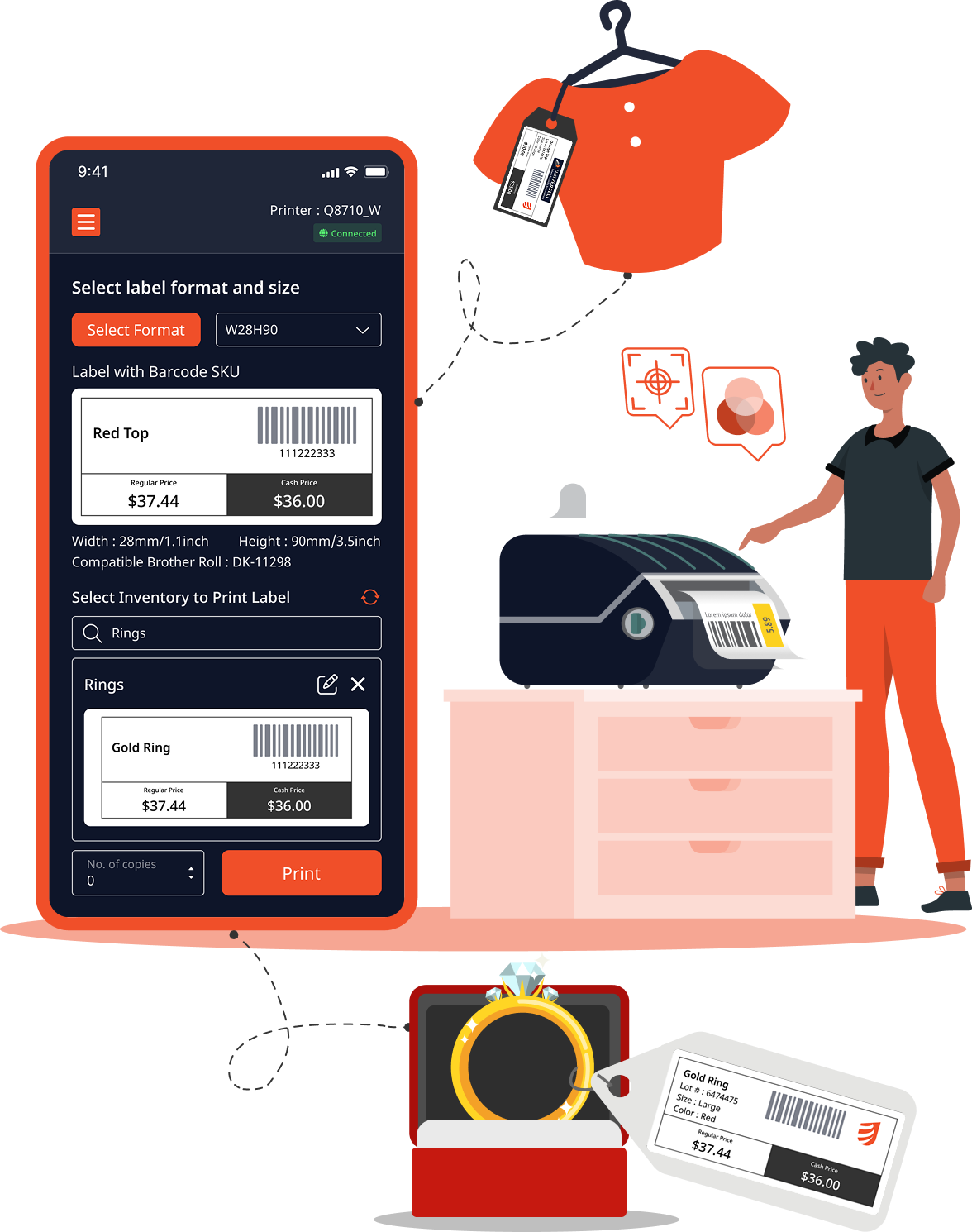
Illustration - Hero Section

Key Features

The Universell Print Label App is packed with tools that make label creation faster, smarter, and more reliable. Here’s what makes it stand out.
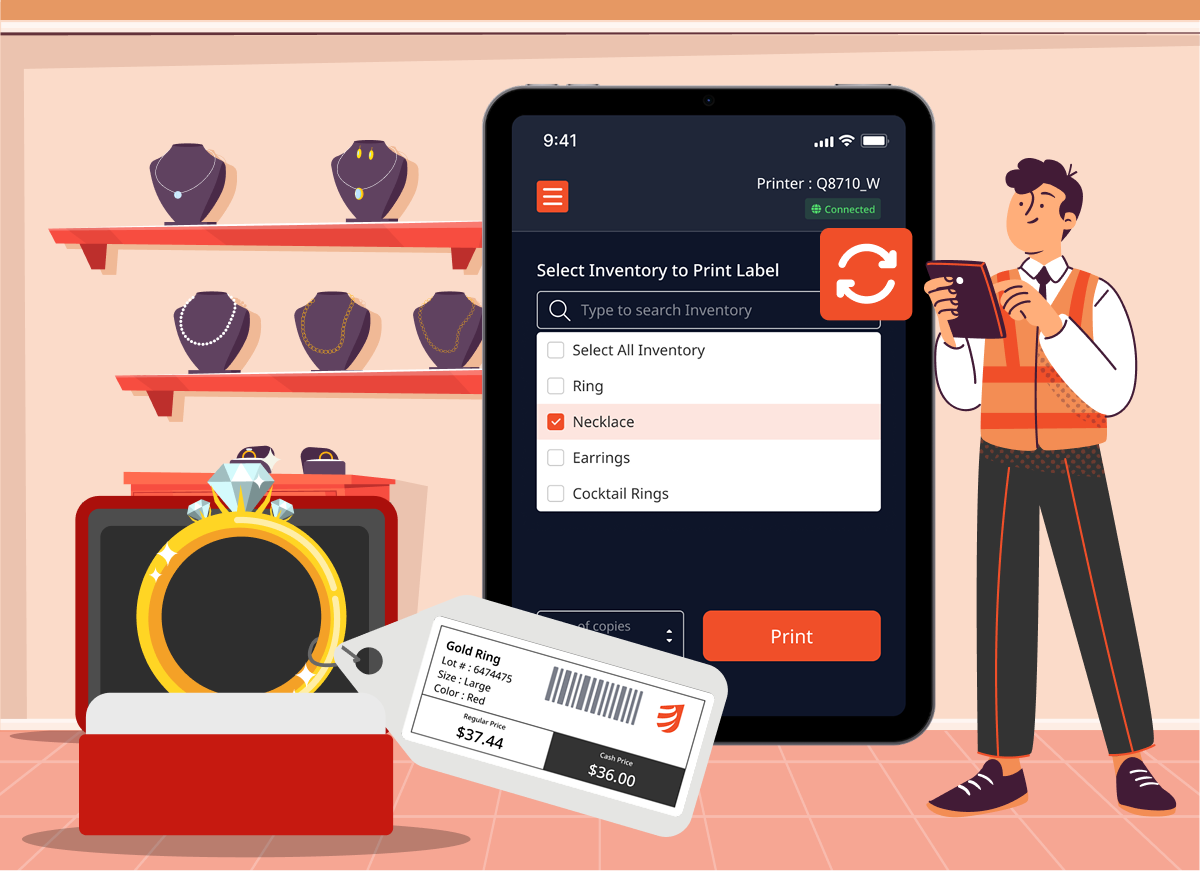
Image - Stay in sync with your inventory

Stay perfectly in sync with your Inventory

The Print Label App is directly connected to your Universell inventory, so every label you print uses the latest product information. No need to copy and paste details or worry about outdated data.
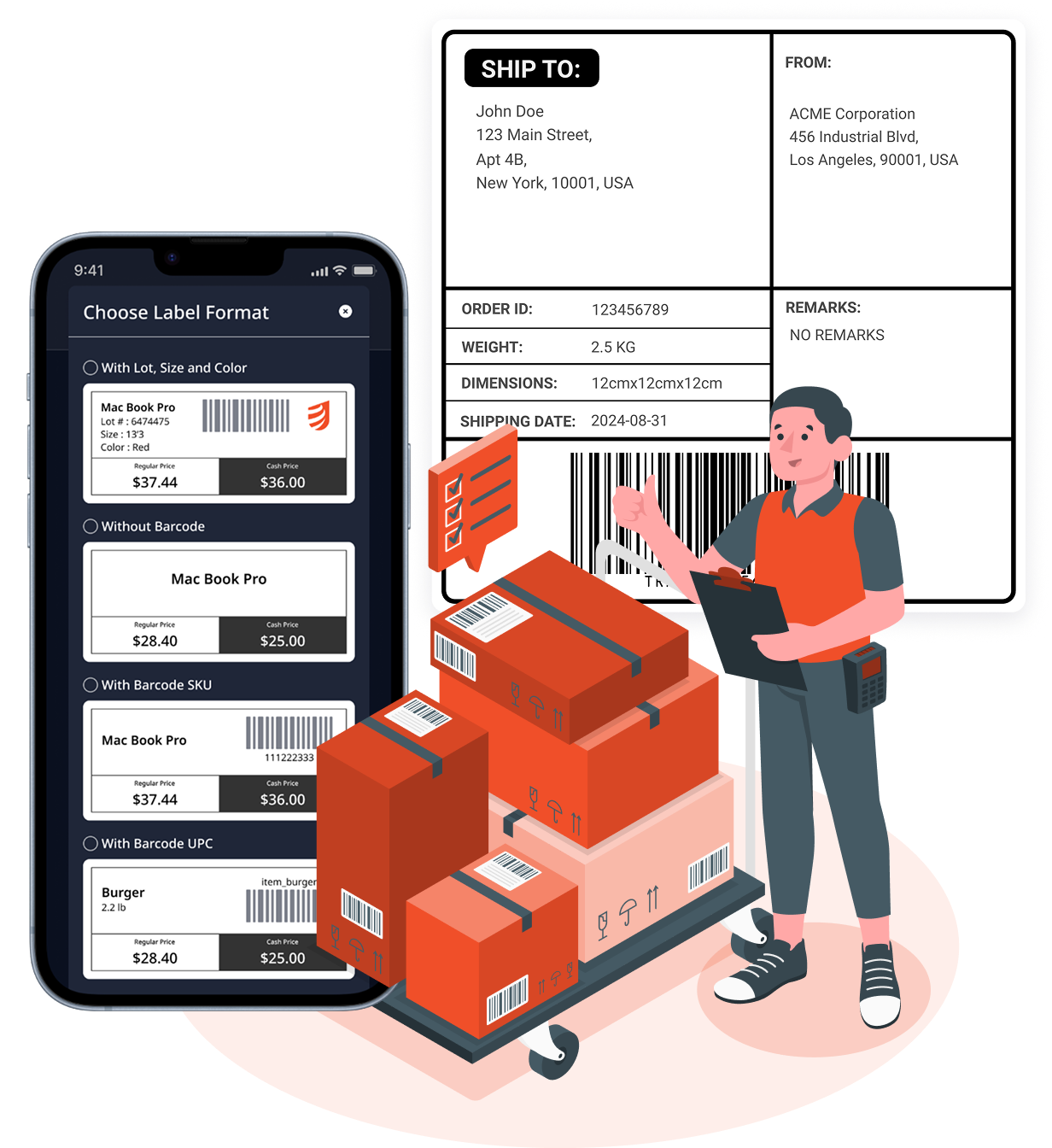
Image - Chose label style

Choose the label style that fits your business

Not all products need the same type of label. Pick from ready-to-use formats such as lot-size-color, barcode SKU, barcode UPC, or even a simple label without a barcode. You decide what works best for your products and customers.
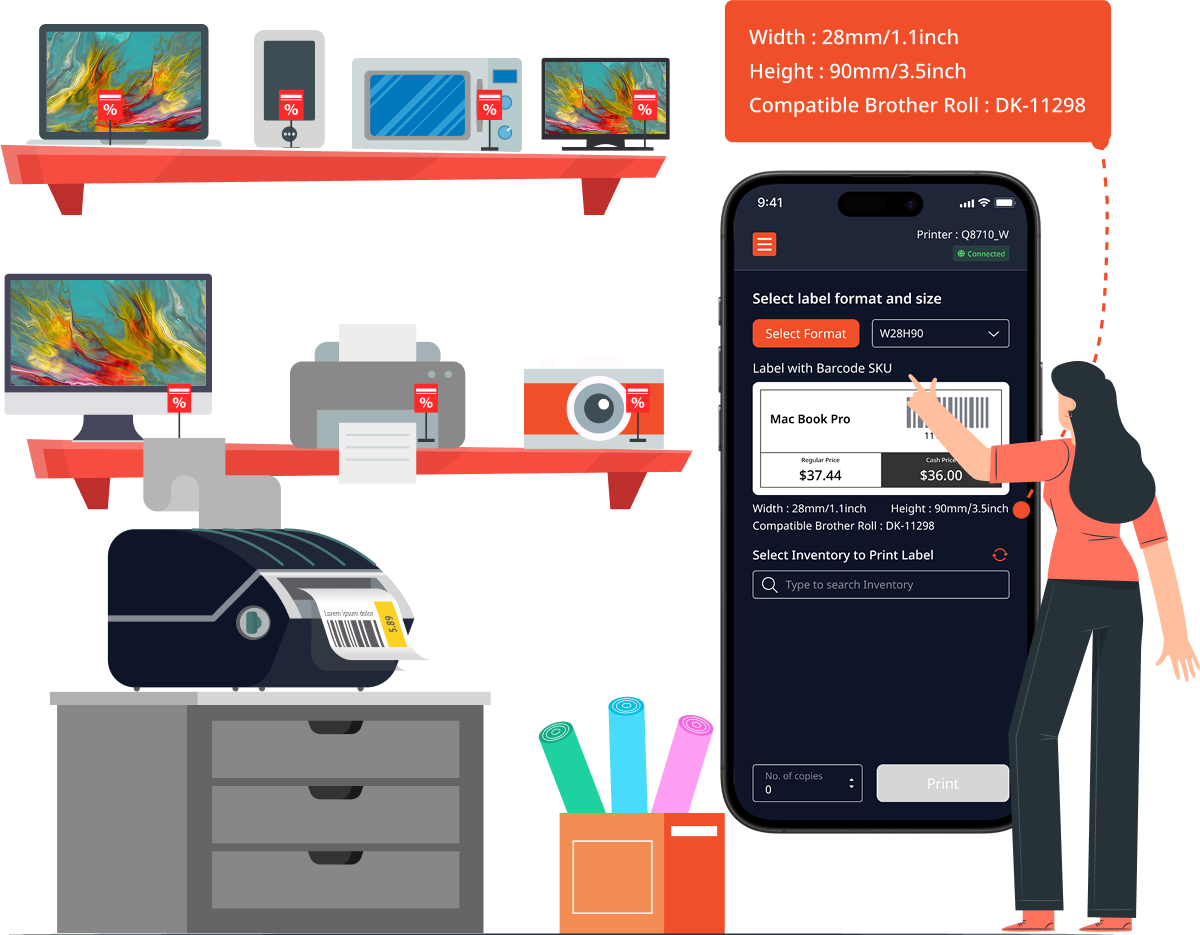
Image - App guide your printing supply

Let the app guide your printing supplies

No more guessing which rolls size will fit your design. Once you select a format and size, the app will recommend the exact roll that matches. This saves you time and avoids wasting labels.

Explore Label Sizes
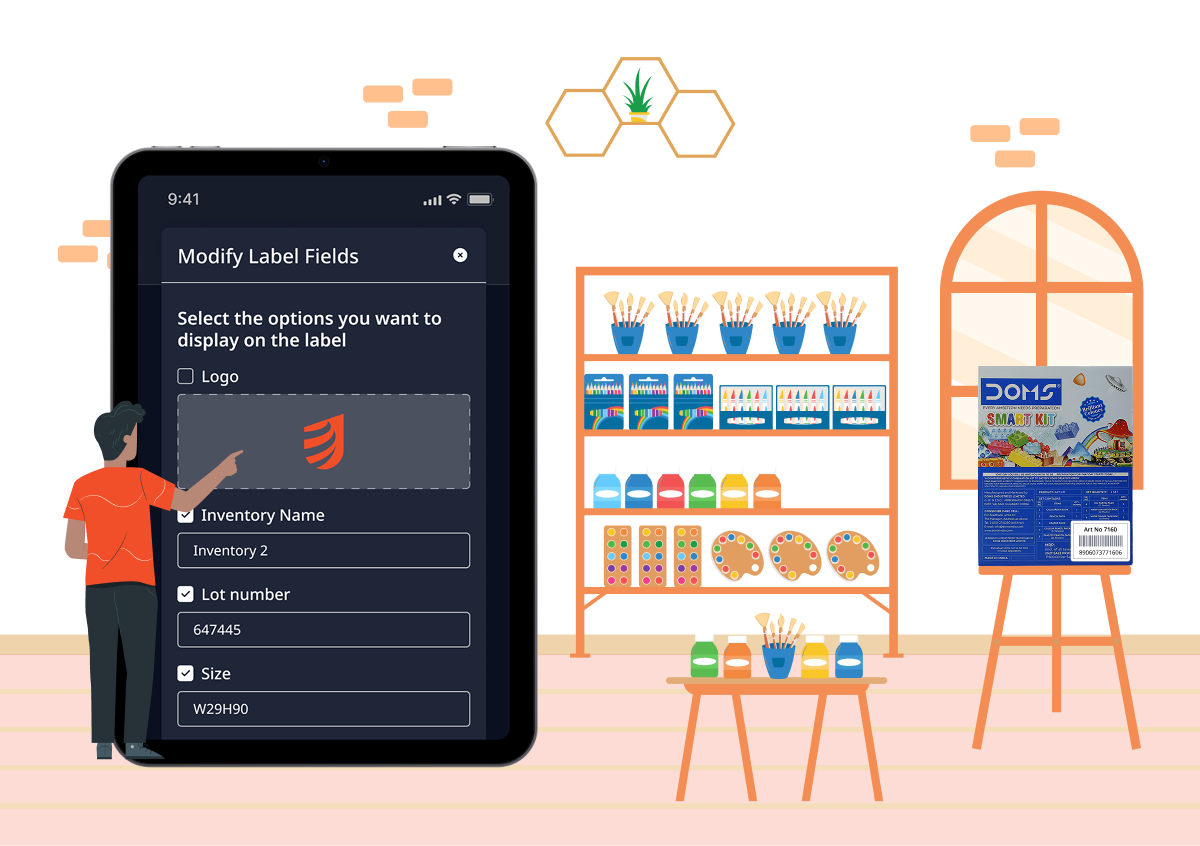
Image - Show off your brand

Show off your brand with every label

Your logo is more than just an image; it is your identity. Upload it once to Universell and the app will automatically add it to your labels wherever you want it, giving every item a polished, professional touch
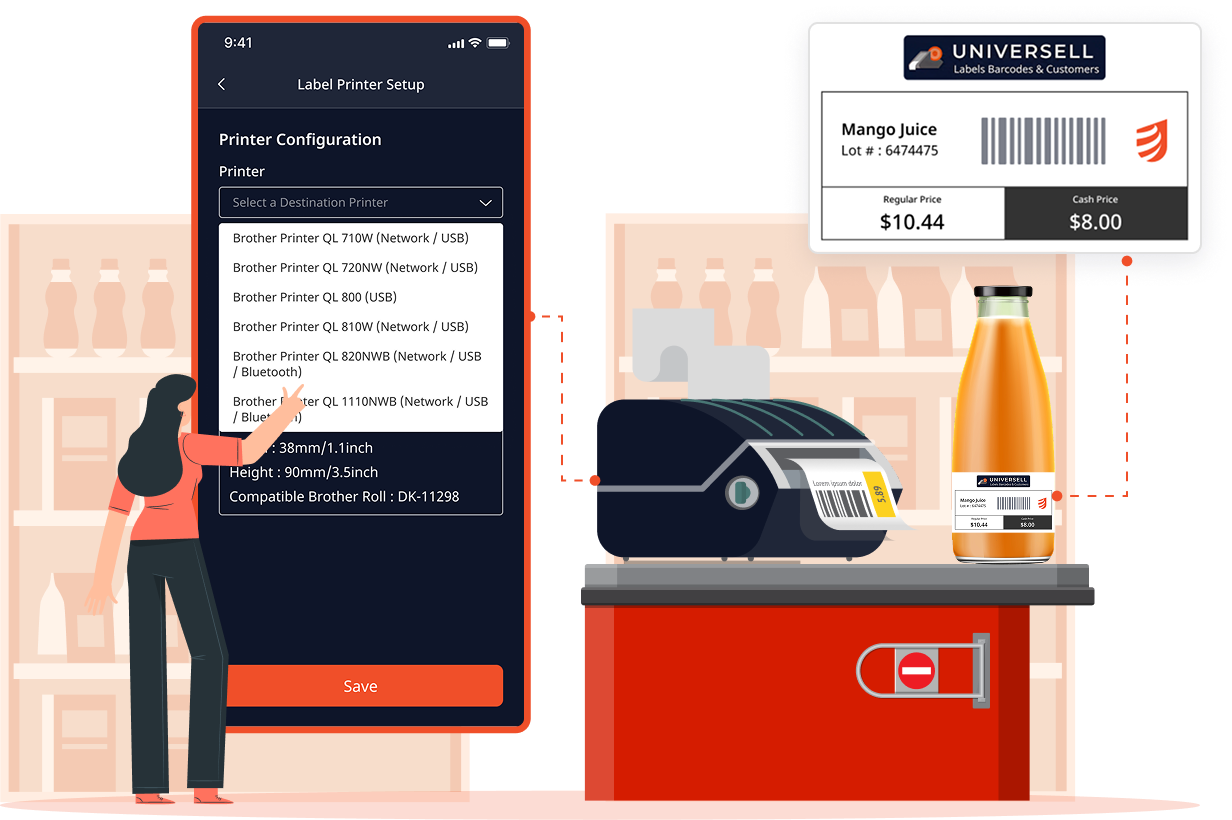
Image - Supported Printers

Print from a wide range of supported printers

Whether you are in the warehouse, at the counter, or in the office, the Print Label App connects seamlessly with popular Brother printer models so you can start printing immediately. Supported models include:

  • Brother Printer QL 710W (Network / Wifi / USB)
  • Brother Printer QL 720NW (Network / Wifi / USB)
  • Brother Printer QL 800 (USB)
  • Brother Printer QL 810W (Network / Wifi / USB)
  • Brother Printer QL 820NWB (Network / Wifi / USB / Bluetooth)
  • Brother Printer QL 1110NWB (Network / Wifi / USB / Bluetooth)

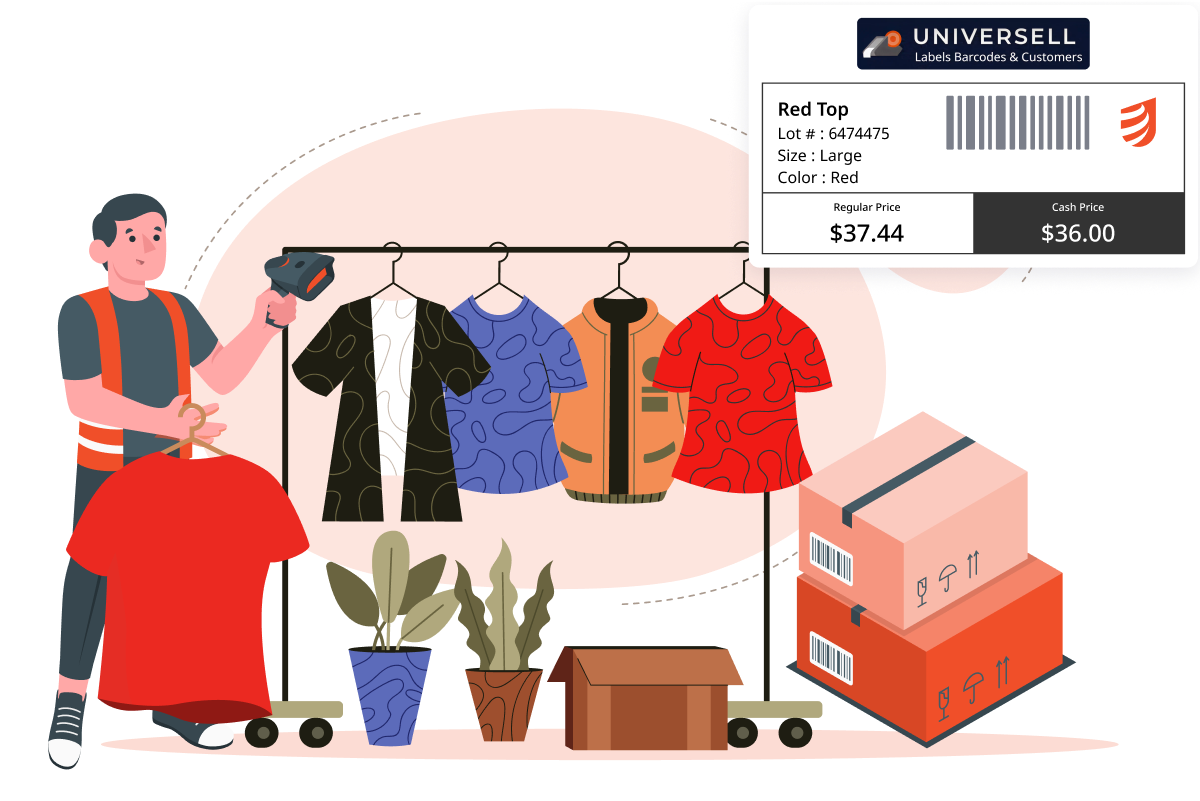
Image - Turn labels into inventory tools

Turn labels into inventory tools

Each printed barcode can be scanned to quickly update stock counts, check product details, or confirm orders. Your labels do more than look good, they work hard for your business.
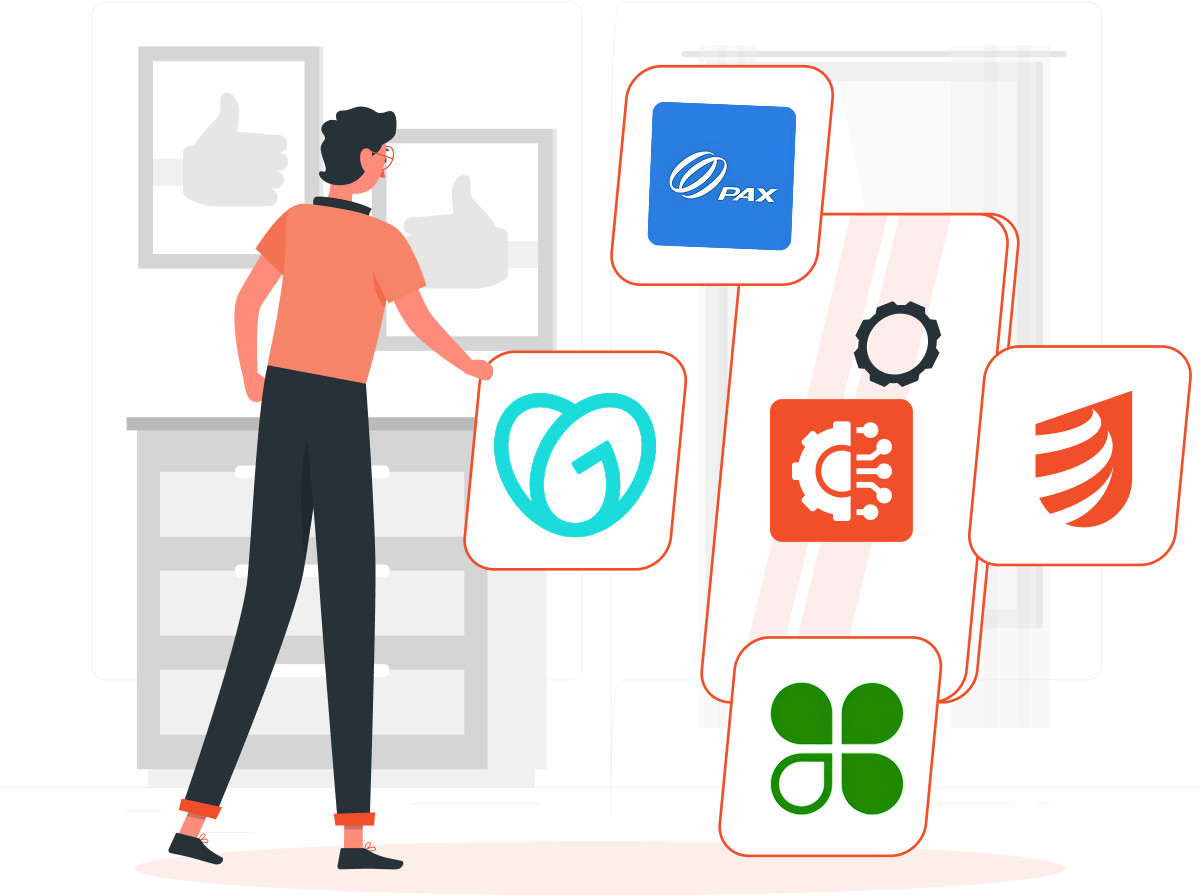
Illustration - integration with other apps

Integrates with other apps

The Print Label App of Universell works smoothly with Clover, GoDaddy, and Pax. This makes it easy to keep your product details consistent across platforms and ensures your labels always match your sales systems.

Label printing made simple, fast, and accurate

Running a business means keeping your shelves stocked and your inventory organized. But printing labels often becomes a slow, error-prone task that eats up valuable time. The Universell Print Label App changes that.

  • Icon - Save Time

    Save time

    Generate labels for multiple items in seconds, not hours.

  • Icon - Real-Time Accuracy

    Reduce mistakes

    Accurate inventory sync ensures the right details appear every time.

  • Icon - Boost professionalism

    Boost professionalism

    Add your logo for labels that look store-ready.

  • Icon - Work smarter

    Work smarter

    Automatic roll recommendations mean no more wasted supplies.

  • Icon - Stay flexible

    Stay flexible

    Print labels anywhere using your existing Brother printer, with the Print Label App ready to go.

Label printing made simple

  • 1

    Choose your label format

    Pick from multiple formats like lot-size-color, barcode SKU, barcode UPC, and more.

  • 2

    Set the size for your industry

    Select your preferred label width and height.

  • 3

    Get roll recommendations

    The app instantly suggests the compatible roll based on your selected size and format.

  • 4

    Select inventory items

    Choose the products you want labels for, directly from your Universell inventory.

  • 5

    Preview your labels

    See exactly how your labels will look before printing.

  • 6

    Make quick edits

    Update any inventory details or label text if needed.

  • 7

    Print and manage

    Enter the number of copies, connect your printer, and click Print. Your labels are ready to use. Scan them to manage inventory on the spot.
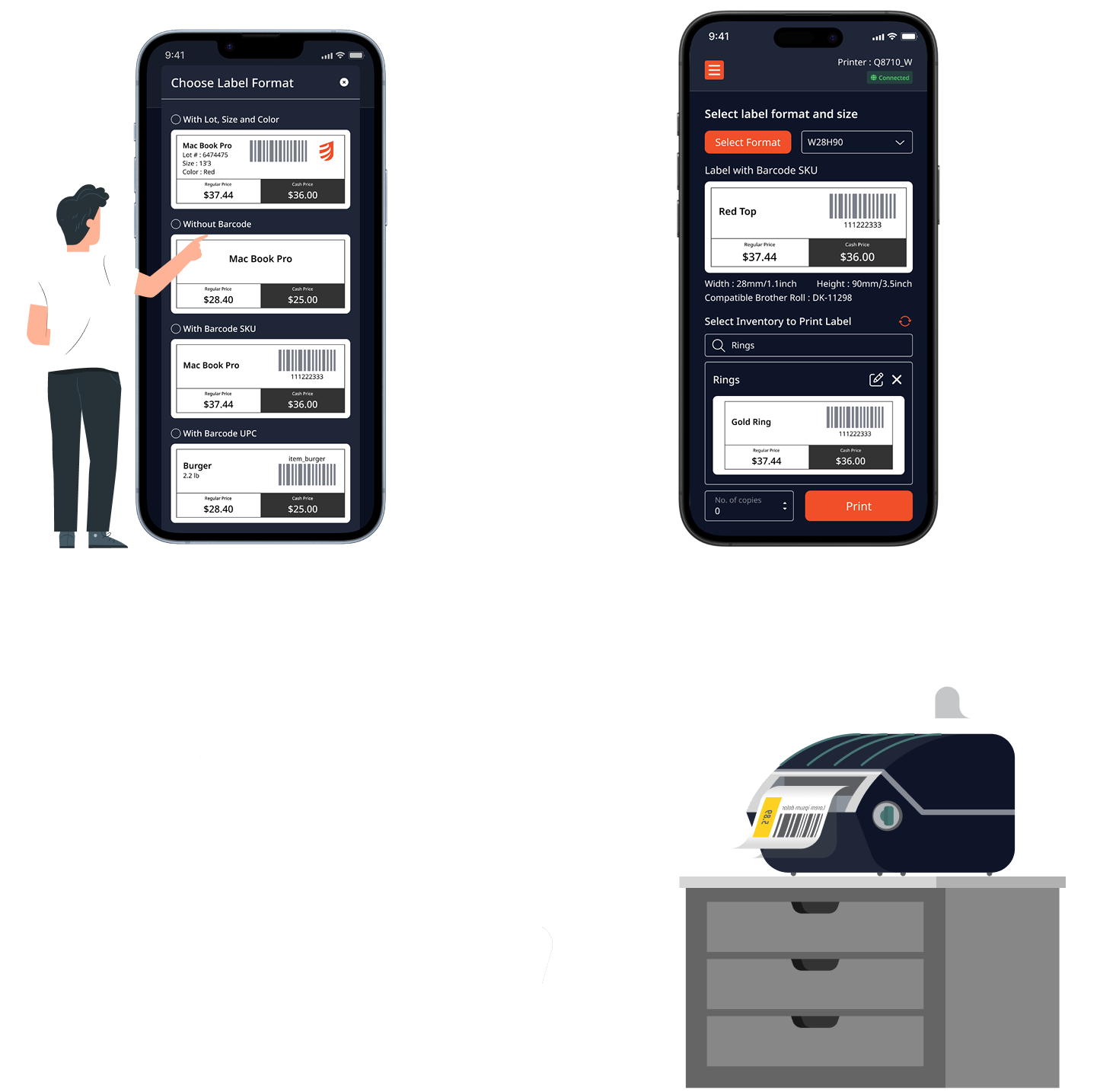
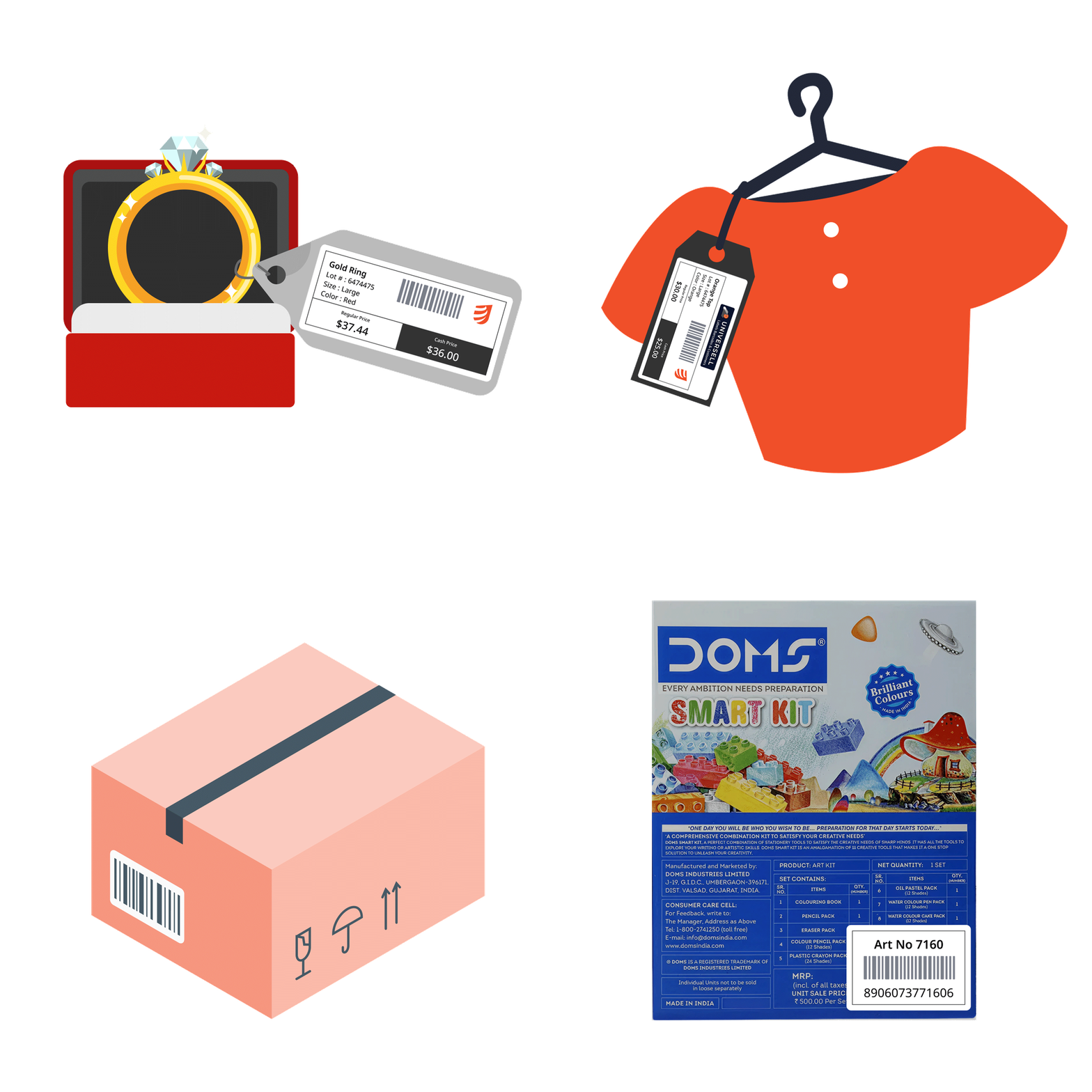
Image---Lbel-Printing-made-simple_crop
animated label

Industries that benefit from our Print Label App

The Print Label App fits into many different businesses, helping them save time, stay organized, and present products professionally.

  • Image - Retail stores

    Retail stores

    Print price tags for electronics, barcode labels for grocery items, jewellery items, etc.
  • Image - Warehouses and distribution centers

    Warehouses and distribution centers

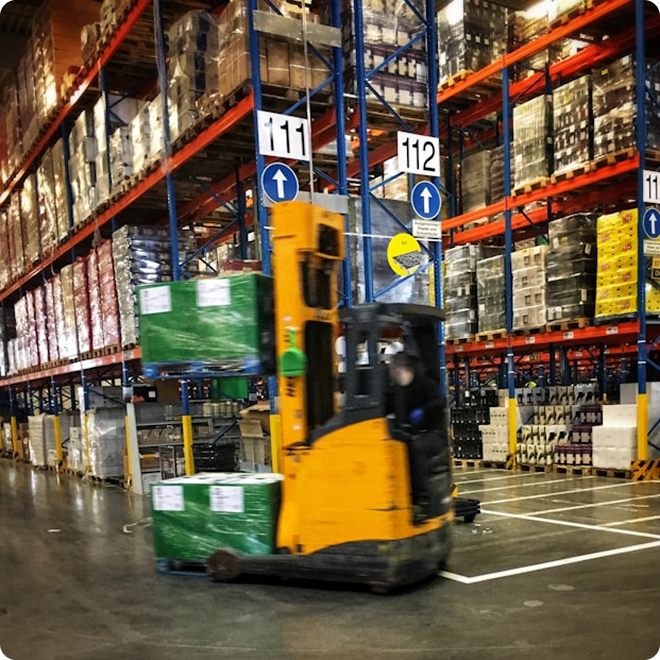
    Create pallet labels for bulk shipments, barcode tags for storage racks, or location labels for faster picking.

  • Image - Manufacturing

    Manufacturing

    Add batch number labels to bottled drinks, product ID labels for spare parts, or quality control tags for finished goods.

  • Image - E-commerce businesses

    E-commerce businesses

    Print branded shipping labels for clothing orders or barcode tags for warehouse tracking.
  • Image - Food and beverage

    Food and beverage

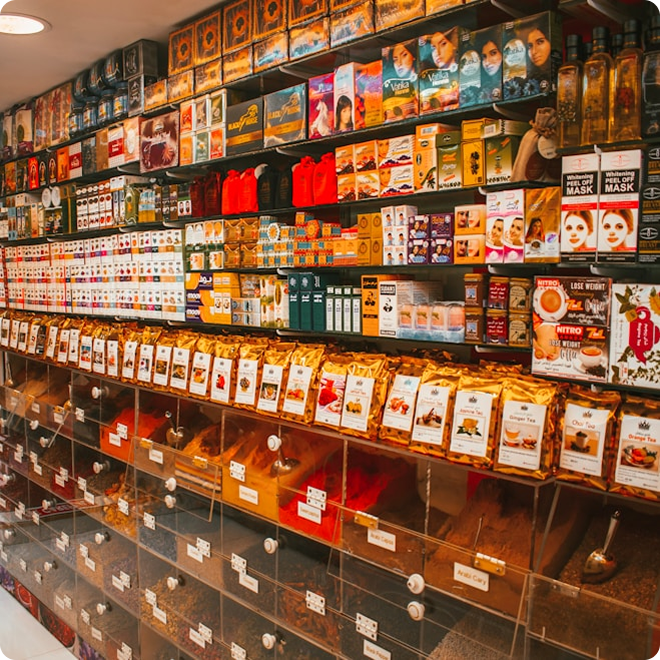
    Label jars of honey, ingredient tags for packaged snacks, or expiration date labels for fresh produce.

  • Image - Apparel and fashion

    Apparel and fashion

    Create size labels for T-shirts, fabric composition tags for dresses, or barcode labels for shoe boxes.


Ready to Simplify Your Label Printing?

Download from Google Play
Compatible Label Sizes and Rolls
Label SizeRoll Type
W29H90DK-11201
W38H90DK-11208
W62H5DK-22113, DK-22205, DK22212, DK-22606, DK-44205, DK-44605
W62H100DK-11202
W60H86DK-1234
W23H23DK-1221
W17H54DK-11204
W29DK-2210, DK-2211
W62RBDK-22251

Wait!

Unlock Powerful Tools to Grow Your Business—Don’t Leave Just Yet!

Wait Exit Modal Image

Manage CRM, Payments, and Sales—all-in-one simple dashboard with Universell

Get the tools you need to streamline operations, boost sales, and grow your business effortlessly! Try it FREE today—no commitment required!

Sign up now and start transforming your business!

Sign Up Now

Your Business Growth Hack Awaits!

Don’t miss out—your competitors aren’t!

83% of businesses using Universell scale faster

And you could be next!

Wait Exit Modal Image
  • Arrow Right

    All-in-one power : Close deals, track payments, and wow customers.

  • Arrow Right

    Zero risk : Try it free—no credit card, no hassle.

  • Arrow Right

    Time saved = Revenue earned : Automate 20+ hours of busywork monthly.

Percent

Exclusive offer First 50 sign-ups this week get premium onboarding FREE ($300 value)!

Claim My Free Trial Now

Unlocking Your Business Potential!

You're just one step away from simplifying your business operations and boosting your revenue effortlessly!

Wait Exit Modal Image
  • Arrow Right

    Automate & Grow : Manage pipeline, Payments & Sales in one easy-to-use dashboard.

  • Arrow Right

    Save Time & Money : Reduce manual tasks and focus on what truly matters.

  • Arrow Right

    Increase Conversions : Powerful tools to keep customers coming back.

Join thousands of businesses already scaling with Universell!

Sign up now & get FREE TRIAL access!

No risk—just results!

Sign Up Now

Help Us Improve Your Experience

Gift Card

Tell Us What You Think & Receive a $25 Amazon Gift Card

Share Your Feedback

Run Your Entire Business from One Smart Dashboard

All-in-one. Easy-to-use. Built for small business growth.

Join thousands of entrepreneurs using Universell to simplify operations, track sales, manage customers, and grow smarter — with 100+ integrated tools at your fingertips.

  • Check Icon CRM, Payments, Scheduling, Inventory, Marketing & More
  • Check Icon No tech team required — just results
  • Check Icon 30-Day Free Trial — no credit card needed

Start now and take control of your business the smart way.

Run Your Entire Business from One Smart Dashboard

All-in-one. Easy-to-use. Built for small business growth.

Join thousands of entrepreneurs using Universell to simplify operations, track sales, manage customers, and grow smarter — with 100+ integrated tools at your fingertips.

  • Check Icon CRM, Payments, Scheduling, Inventory, Marketing & More
  • Check Icon No tech team required — just results
  • Check Icon 30-Day Free Trial — no credit card needed

Start now and take control of your business the smart way.

Simplify the way you manage your workforce

From tracking hours to scheduling, payroll prep, and team communication—Universell brings everything you need to manage employees into one smart dashboard.

Track Hours & Shifts

Track Hours & Shifts

See when team members clock in/out, edit entries, and export timesheets.

Payroll Made Easy

Payroll Made Easy

Automate calculations, manage 1099 records, and handle sales-based commissions (not a full payroll system).

Smart Scheduling & Appointments

Smart Scheduling & Appointments

Set availability, avoid double-booking, and sync with Google & Outlook.

Built-In Communication Hub

Built-In Communication Hub

Send messages, emails, or make calls directly within the system.

Secure File Cabinet

Secure File Cabinet

Upload, organize, and share important documents safely.

Workforce Analytics & Reporting

Workforce Analytics & Reporting

Spot top performers, track attendance, and filter reports by time range.

Bring your team, tools, and tasks together with Universell. Simplify employee management, reduce errors, and give yourself more time to focus on growth.

Get Started Today
WordPress Integration

WordPress powers a significant portion of websites worldwide, thanks to its flexibility and a massive ecosystem of themes and plugins. With the Universell plugin, you can enhance your WordPress E-commerce experience. This powerful tool allows you to seamlessly integrate your existing WordPress site with Universell, providing a robust set of features to manage and grow your business efficiently.

Connect Universell with Your Wordpress Site

1

Install & Activate

From your WordPress dashboard, simply install and activate the Universell Plugin.

2

Connect your account

Enter your merchant email and password to link your existing Universell account. New to Universell? Sign up first, then return to connect your account.

3

Enjoy Real-Time Sync

Inventory, orders, and customer data automatically sync between WordPress and Universell, so you’ll never worry about mismatched information again.

With the Universell Plugin for WordPress, you can unify store’s operations, reduce manual work, and focus on growing your business.

Connect my WordPress site with Universell
Build Landing Pages & Websites with Ease

Bring your business online in minutes with Universell. Whether you want to showcase products, promote services, or create a complete website, our intuitive builder helps you do it all. No technical expertise required.

What you can do:

Track performance with detailed page logs

Track performance with detailed page logs

Understand how your pages are performing. Get insights into traffic, user engagement, and clicks so you can optimize for better results.

No coding knowledge required

No coding knowledge required

Anyone can build stunning pages with Universell. Drag, drop, and publish your site in no time with minimal effort.

Flexible, responsive design

Flexible, responsive design

Your pages automatically adapt to desktop, mobile, and tablet views, ensuring a smooth experience for every visitor.

Create custom landing pages or websites tailored to your business needs

Create custom landing pages or websites tailored to your business needs

Design a professional online presence that matches your brand. Highlight what matters most, from products and services to special offers.

Promote and showcase your products effectively

Promote and showcase your products effectively

Use engaging landing pages to spotlight your products. Capture attention, drive more sales, and turn visitors into customers.

Bring your ideas to life with Universell’s landing page and website creator. Create, launch, and track now all in one place.

Create a Custom Landing Page
Smarter Order Management & Shipping, All in One Place

Manage every step of your order journey without switching between systems. Universell brings together all your orders in one easy-to-use dashboard, so you can stay on top of sales, payments, and shipping seamlessly.

Instant payment visibility

Instant payment visibility

Quickly check the payment status for each order, whether paid, pending, or overdue, so you always know where your revenue stands.

Real-time shipment tracking

Real-time shipment tracking

Track shipments from dispatch to delivery and know the exact moment your customer receives their order.

Pay unpaid orders instantly

Pay unpaid orders instantly

Settle any unpaid orders directly from the order list with just a few clicks – saving time and avoiding delays.

All orders in one view

All orders in one view

Access every order from FastShop, Invoice, E-Sign Agreement, Pax, and other modules in one central dashboard. No need to juggle multiple tabs or tools.

Seamless packing and shipping

Seamless packing and shipping

Prepare items securely for delivery and choose whether to ship with or without a shipping label. Universell keeps the process simple while ensuring your products reach customers safely.

With Universell, order management and shipping become effortless, transparent, and reliable. Stay organized, deliver faster, and keep customers happy, all from one place.

Create a Custom Landing Page
Connect with Your Favorite Apps

Universell makes it easy to run your business smoothly by syncing with the tools you already use. Manage everything from one place with customers, inventory, payments, and shipping all in sync. What you can do:

  • Sync customers, inventory, and orders : Keep your data always up to date across apps like QuickBooks, Xero, Pax, WordPress, and Zapier without manual effort.
  • Simplify payments : Accept payments through PrimeGateway, Authorize.net, and other gateways or even crypto with complete security.
  • Ship smarter with Uber Direct : Deliver orders quickly and reliably straight to your customer’s doorstep.
  • Integrate with accounting apps : Stay on top of finances with QuickBooks and Xero using automated updates and easy reconciliations.
Start using Universell Today
CRM & Sales Analytics That Drive Growth

Understand your customers better and track sales performance in real time. Universell CRM Analytics gives you the insights you need to make smarter business decisions, improve customer relationships, and increase revenue. With CRM & Sales Analytics you can:

  • Make confident, data-backed decisions that move your business forward.
  • Keep a pulse on customer engagement to strengthen relationships.
  • Identify VIPs & top spenders who bring maximum value.
  • Measure marketing ROI and track the impact of your campaigns.
  • Identify upsell opportunities to maximize customer lifetime value.
  • Track overall sales performance at a glance with clear, visual reports.

Make data-driven decisions today. Maximize your ROI and grow faster with Universell’s performance analytics.

Get Started with Universell
Unlock the power of Order and Inventory Analytics

With Universell, you get access to powerful inventory analytics that help you make informed decisions. Instantly see which products are flying off the shelves and which ones need rethinking. Understand market trends, forecast demand, and get a complete overview of your inventory performance. Our Margin Report goes a step further by showing which items bring in the most profit, helping you focus on what really moves the needle for your business.

Get Started Today
Smarter Marketing Starts with Better Insights

Understand how your campaigns are performing and turn data into decisions that drive growth. Universell’s real-time analytics give you a complete view of what’s working and where to improve. What you can track :

  • Track open rates to measure audience engagement.
  • Monitor click-through rates and see which messages drive action.
  • Measure purchase conversions to link campaigns directly to revenue.
  • Analyze email deliverability for better inbox placement.
  • Check bounce rates to maintain a healthy email list.
  • Monitor spam reports to protect sender reputation.
  • Refine future campaigns with actionable insights.
  • Boost sales with smarter decisions powered by data.

Make data-driven decisions today. Maximize your ROI and grow faster with Universell’s performance analytics.

Get Started with Universell
Stay on Top with Daily EOD Reports

End your day with complete clarity on how your business performed. Universell’s EOD Report gives you a quick, actionable summary so you can make better decisions for tomorrow. What you get in your daily report:

  • Overall sales summary : Know exactly how much your business earned today.
  • Customer insights : See who purchased the most and which customers drove maximum profit.
  • Inventory status : Identify high-selling and low-selling items to manage stock effectively.
  • Employee performance & payroll: Track how your team performed along with payroll details in one place.

Start every new day with smarter insights. Get EOD reports delivered automatically and keep your business growth on track.

Get Started Today
Footer Logo
Top Features
  • CRM
  • Inventory
  • Website Builder
  • Team Collaboration
  • Telephony
  • Employee Management
  • Invoicing & Billing
  • E‑Sign & Payments
  • Order Management & Shipping
  • Virtual Terminal
  • E‑Commerce
  • Email Builder & Campaigns
  • SMS Marketing
  • Rewards & Loyalty
  • Custom Forms
  • Automated Operations
  • Appointment & Booking Systems
  • Analytics & Reporting
  • WordPress Integration
  • Zapier Integration
  • Point of Sale
  • Pipeline
  • Payroll Reporting
  • AI Assist
  • Custom Software Development
Partners
  • Developers & Agencies
  • Accountants & Tax Consultants
  • Universell Beta Program
  • Startup & Founders
Business Types
  • Retail
  • Service
  • E-commerce
  • Salon
Resources
  • Blog
  • Platform Schema
  • Release notes
  • Webinars
  • FAQs
Company
  • About Us
  • Pricing
  • Integrations
  • Free Sign Up
  • Schedule a Demo

facebook logo_icon instagram youtube linkedin
Privacy Policy Terms of Service Cookie Policy Acceptable Use Policy
© 2026 Universell. All Rights Reserved.
Lead Management

Leads Management

Track every prospect in a dedicated leads workspace with deal value, source, assigned rep, and creation date at a glance. Import leads in bulk or add them one at a time with + New Lead, then move qualified prospects into your customer database when they are ready.

Leads stay separate from your customer list so your team can focus on qualification and assignment without cluttering active accounts. Filter by period, employee, status, and segments to prioritize follow-up and keep pipeline hygiene tight.

Customer Segments & Groups

Customer Segments & Groups

Build dynamic customer segments and static groups to slice your database by behavior, lifecycle stage, source, or any custom criteria. Segments power bulk actions, filtered views, and smarter campaign targeting across CRM and marketing.

Use groups for account hierarchies, VIP lists, or regional rollups-then apply them everywhere customers appear, from the main customer table to analytics and automation triggers

Lead Catcher

Lead Catcher

Deploy embeddable Lead Catcher forms that capture name, contact details, and intent the moment a prospect submits on your site. Every submission lands directly in Universell as a new lead—no manual entry, no lost inquiries.

Configure multiple catchers for landing pages, campaigns, or partner sites. Submitted data syncs instantly with lead records and appears on the customer 360 profile under Lead Catcher history for full traceability.

CRM & Deal Analytics

CRM & Deal Analytics

Open CRM Analytics and Deal Analytics dashboards to see new deals, current pipeline value, won/lost counts, and forecasted revenue on one screen. Conversion charts show how opportunities move stage by stage so managers can spot bottlenecks before they cost revenue.

Drill into deal source distribution, won/lost analysis, and revenue by source to understand which channels deliver the highest-value opportunities. Use these insights to coach reps, adjust stages, and align sales and marketing spend with what actually closes.

Customer 360 Profile

Customer 360 Profile

Open any customer to see a full 360° profile: contact and business info, health score, reward points, segments, assigned employee, billing and shipping addresses, and more. Quick actions let reps call, SMS, email, add notes, create invoices, agreements, tickets, or appointments without leaving the record.

Profile tabs consolidate communication history, notes with @mentions, orders, agreements, active deals, metrics, tickets, submitted forms, uploaded files, and saved payment methods. Everything your team needs to serve the customer is in one place.

CRM Automation

CRM Automation

Set up CRM Automation rules that run when leads are created, deals change stage, tickets age, or customers hit a segment threshold. Trigger emails, SMS, task assignments, status updates, and internal notifications without manual intervention.

Reduce dropped balls and inconsistent follow-up by letting Universell enforce your playbooks. Automation works alongside segments, forms, and pipeline stages so growing teams scale outreach without scaling headcount.

Customer App

Customer App

Offer a dedicated Customer App where clients sign in to see their profile, orders, agreements, appointments, and support tickets. Reduce inbound calls by letting customers check status, update details, and interact with your business on their schedule.

The app connects to the same CRM data your team uses internally, so self-service actions and portal activity stay in sync with the customer 360 profile and communication log.

Appointment Catcher

Appointment Catcher

Publish Appointment Catcher forms on your website so prospects and customers book time without back-and-forth email. Availability rules and employee schedules control which slots appear, and confirmed bookings flow straight into My Calendar and the customer record.

Pair with employee scheduling to balance team capacity across locations or roles. Every booked appointment is tied to the contact in CRM for reminders, follow-up, and reporting.

SMS Marketing

SMS Marketing

Launch one-to-many SMS campaigns from your connected business numbers. The campaign dashboard shows schedule, recipient count, delivered and undelivered totals, and status—Completed or Active—at a glance.

Built-in SMS Policy & Best Practices keeps outreach compliant. Monitor credit usage and delivery rates, buy add-on credits when volume spikes, and pair campaigns with segments for targeted promotions, reminders, and re-engagement.

VoIP Calls & Call History

VoIP Calls & Call History

Run your business phone system inside Universell with inbound and outbound VoIP calling. The Call History dashboard shows total calls, missed calls, average duration, and completion rate—filterable by date range, category, and status (All, Missed, Ongoing).

Every log entry records who initiated the call, recipient, direction, duration, and status. Add notes inline and launch follow-up Call, SMS, or Email actions from any row without leaving the log.

Call Scripts

Call Scripts

Build a library of call scripts your reps can open during live conversations. Search, create, edit, delete, or pop out scripts in a three-pane layout—script list on the left, full script detail in the center.

Creator and last-updated audit trails keep scripts current as offers, policies, or talk tracks change. New hires sound like veterans from day one.

Call Forwarding

Call Forwarding

Enable or disable call forwarding per business phone number and choose where calls should land—another user, extension, or external line. Set scheduled forwarding with start and end dates, times, and day-of-week rules for after-hours or holiday coverage.

Use keep active until I turn off for open-ended forwarding, or time-box rules for temporary coverage when reps are out of office.

Phone Numbers, Extensions & Call Groups

Phone Numbers, Extensions & Call Groups

Purchase local or toll-free numbers by area code, state, or city—browse 2,700+ area codes and assign each number to users with role, email, and extension metadata. Four-digit extensions support fast internal transfers between people and departments.

Call Groups let departments share an extension and ring simultaneously—the first person to answer connects the caller. Optional schedules control when each group is active by date, time, and day of week.

Voicemail

Voicemail

Access voicemail without dialing into a separate system. Received and Sent tabs organize messages by direction, with search once you type three or more characters.

Add new contacts on the fly and keep voicemail alongside call history and SMS so nothing falls through the cracks.

SMS Inbox & Messaging

SMS Inbox & Messaging

Manage two-way SMS from a dedicated inbox with conversation search and threaded messaging. Pick your default sending number, open SMS Templates for reusable replies, and start new threads with + New Contact.

The Overview tab tracks credit usage, delivery rate, and phone number status so you always know capacity before peak campaigns or busy seasons.

Business Email

Business Email

Work from Inbox, Sent, and Scheduled tabs with a rich text composer—styles, images, tables, links, and HTML source editing. Schedule individual sends for a future date and time, separate from bulk marketing campaigns.

The sent log records customer, employee, template name, subject, SendGrid delivery source, and timestamp—with view and resend actions. System templates cover password resets, transaction confirmations, booking confirmations, and more.

Collaborative Documents

Collaborative Documents

Open the Documents workspace to draft proposals, SOPs, and customer-facing content in a multi-tab editor. A full rich text toolbar and HTML source view give you formatting control; Generate with AI speeds up first drafts.

Search the sidebar document list, work on several docs at once, and share or delete with per-document actions. Keep templates and knowledge base articles where your team already communicates.

Customer Communication Log

Customer Communication Log

Every customer 360 profile includes a Communication tab with a full history log filterable by date. Quick actions on the profile—Call, SMS, and Email—launch outreach without hunting for contact details.

Notes with @employee mentions (up to 32k characters) sit alongside the communication log so context from internal discussion and customer-facing messages stays in one record.

Communication Settings

Communication Settings

Administrators manage channel setup under Settings → Communication Settings. Configure email delivery, SMS providers, phone number inventory, and a unified communication history view.

Link purchased numbers to users, extensions, and call groups; review forwarding status; and keep telephony, messaging, and email policies aligned with how your business actually operates.

Product Catalog

Product Catalog

Browse inventory in Grid or List view with search, category filters, and toggles for sale items and promotional pricing. Tabs separate sellable inventory, services, internal/self-use, damaged, demo units, and soft-deleted items—each with its own workflow.

Every row shows SKU, quantity, price, in-store location, modifiers, and per-store stock. Quick actions cover price edits, commission setup, cloning, QR table-top prints, and channel visibility for POS, FastShop, and online store.

Add & Edit Products

Add & Edit Products

Add products without variant or with variant (size, color, material)—each variant gets its own SKU and independent stock. Use the AI-assisted description generator, rich text or PDF attachments, and image uploads to build complete product pages.

Configure opening stock across four buckets—For Sale, Damaged, Internal/Self Use, and Demo Units—plus sale pricing, taxes, discounts, vendor links, shipping details, and selling options for POS register, online store, FastShop, and Google.

Bulk Import

Bulk Import

Choose your import strategy: Reset & Import Fresh (replace all stock), Update Existing Stock (adjust quantities and add new items), or Import From Fresh (add new items only). A four-step wizard walks you through downloading the Universell template, preparing data offline, uploading `.xlsx`, and executing the import.

Column headers must match the template exactly—modified headers are rejected. Verify results in Manage Inventory after every run.

Categories, Subcategories & Locations

Categories, Subcategories & Locations

Create product categories with images, descriptions, and Show on FastShop visibility. Drag to reorder categories, then add subcategories under each parent with their own images and FastShop display settings.

Assign In-Store Locations (e.g., Shelf 20 Bin 50) so floor staff and count teams find items fast. Category and location filters power list views, counts, and reports across the module.

Modifiers & Customization

Modifiers & Customization

Build Modifier Groups and individual Modifiers for extras like toppings, packaging, or service add-ons. Modifiers adjust price at sale time without affecting stock—perfect for restaurants, retail customization, and service upsells.

Attach modifier groups to products on the Modifiers tab during add/edit. Customers choose options at POS or online; your catalog stays lean while checkout stays flexible.

Product Bundles

Product Bundles

Create four bundle types: Buy 1 Get 1, BOGO at a Discount, Product Bundle, and Product Bundle with Overall Discount. A four-step wizard covers bundle type, basic info, component products, and preview before publish.

Bundles appear on POS and FastShop—Universell auto-creates a Bundles category online so customers discover combo deals without extra setup.

Stock Adjustment

Stock Adjustment

Open the Adjust Stock modal from Manage Inventory to move quantity in or out for any item. Stock-In captures unit cost price; Stock-Out records reductions. Choose an adjustment reason and add remarks for audit clarity.

Every adjustment logs to the Inventory Log instantly. The system supports negative for-sale quantities when your workflow requires it.

Physical Inventory Count

Physical Inventory Count

Start a count with Scan & Count (barcode/SKU one-by-one on the floor) or View List & Update Count (bulk entry by category and location). Track progress across sellable, damaged, demo, and internal buckets per item.

Counts move through In Review and Counted tabs. Review mismatches, print or download PDF/CSV reports, and share results with managers before finalizing.

Low & High Stock Alerts

Low & High Stock Alerts

Set minimum and maximum quantity thresholds per product with email and phone recipients. When stock crosses a boundary, Universell fires alerts so you reorder before a stockout—or flag overstock before cash gets tied up.

Low and High Inventory Alert reports show trigger quantity, trigger date, and category context. Link alerts to vendors for faster procurement follow-up.

Call Scripts

Inventory Audit Log

The Inventory Log records every stock change—transaction type, quantity in/out, running stock in hand, remarks, and who updated it. Filter by date, item, category, customer, or vendor; export for reconciliation and compliance.

Drill into any entry to view the linked invoice, count session, or adjustment. Negative balances display when applicable so nothing is hidden from auditors.

Customer App

Inventory Count App

Download the Inventory Count App for Android and sign in with your Universell credentials. Manage categories, modifiers, and variants on the device with real-time Wi-Fi sync to the web dashboard.

Scan barcodes on the sales floor, update counts without a desktop, and request one-on-one training from inside the app. Changes sync bidirectionally with Clover POS and your integrated website when connected.

Inventory Analytics

Inventory Analytics

Filter analytics by Fixed, Variable With Tracking, or Variable Without Tracking inventory. KPI cards cover vendors, purchase orders, reorders, imports, received stock, damaged items, sale pricing, and alert counts.

Switch between chart and grid views for top products, top categories, and weakest performers. Open Margin Report, Sales Analysis, Profit Analysis, and Inventory Summary tables showing total value, potential revenue, profit margin %, and quantity in stock—with print and download export.

Receive Inventory & Purchase Orders

Receive Inventory & Purchase Orders

Create purchase orders one vendor at a time—add line items with cost, reorder qty, and place order. Or use Manually Add Stock to receive items from multiple vendors without a PO.

Tabs track Open Purchase Order, Purchase Order Received, and Inventory Received with variance columns for difference, damage qty, and tester qty. Receive inventory during the flow or add new products on the fly.

Multi-Store Management

Multi-Store Management

Connect stores by Merchant ID or email, then approve inbound and outbound connection requests. Connected partners sync inventory, customers, rewards, coupons, gift cards, and stock transfer eligibility.

Manage active connections, pending requests, and cancelled partnerships from one screen. Mutual approval is required before sync begins—review each request before accepting.

Stock Transfers

Stock Transfers

Start a transfer from your current store to any connected destination. Search products, see available quantity at source, and enter transfer qty—over-transfer is blocked when stock is insufficient.

Both stores update automatically: source gets Stock-Out, destination gets Stock-In. Add notes for restocking reasons or seasonal balancing; every transfer logs to the Inventory Log.

Vendor Management

Vendor Management

Build a vendor list with company name, contacts, email, phone, lifetime purchase value, and total received quantity. Upload vendor documents (PDF, Office formats) and track 1099-related fields for accounting.

Jump to Reorder from any vendor row. Toggle vendor status on/off without losing history.

Reorder Workflow

Reorder Workflow

Open a vendor's Product Reorder tab to see qty on hand, suggested reorder qty, unit cost, and line totals. Select items in bulk, then download, print, share, or Place Order to generate a purchase order.

Purchase Orders and Order History tabs track PO amounts, receipt variance, damage qty, and differences over time—so procurement stays tied to what actually arrived.

Inventory Automation

Inventory Automation

Create Inventory Automation rules with trigger name, inventory event, notify targets (customer, employee, merchant, or external source), and linked SMS and email templates. Preview templates before save, then set scheduling or recurrence in step two.

Alert the right people when stock runs low, shipments arrive, or custom inventory triggers fire—without manual follow-up from your ops team.

Lead Management

Add & Edit Employee

The Add Employee wizard walks through seven steps: basic information, access authorizations, confidential data,
wages, commission, file uploads, and login access with working hours. Capture gender, position, role, PIN, emergency
contacts, SSN, tax ID, 1099 tracking, and pay rate (hourly or salary) in one flow.

Edit Employee adds an Agreements step for job responsibility, skills, description, and notes—plus top actions to
reset password, log in as employee, chat, or mail. Upload documents and images with type constraints; restrict login by
timezone, weekday, and time slot, with an option to allow access outside working hours.

Customer Vault

Role & Permissions

Assign roles and fine-tune permissions with a View / Create / Edit / Delete matrix per module—Customer, CRM Automation, Leads, Pipeline, Customer Segment, Lead Catcher, Custom Forms, and more. Use Manage Role to define templates, then apply them during add or edit employee.

New hires get the right access on day one; role changes propagate without rebuilding accounts from scratch. Permissions align with Universell's sidebar modules so security matches how your business actually operates.

Bulk Import

Employee Import

Choose Basic Import to download a sample CSV/XLSX with essential fields—keep column order, leave optional fields blank, and upload. Best for fast, minimal onboarding when data is already clean.

AI Import uploads your file, validates entries, auto-corrects where possible, and lets you review results before final import. Both modes include an import guide video so HR and ops can self-serve without IT tickets.

Payroll & Wages

Payroll & Wages

Open Payroll Report, pick an employee and date range, and switch tabs: Wages (regular and overtime hours,
rates, gross pay), Order Commission, Volume Commission, Inventory Commission,
Deductions, and Payments.

A right-side summary card rolls up wages, each commission type,
deductions, and total due as of the report date. One workspace
replaces scattered spreadsheets when it's time to pay the team.

Order Analytics

Volume Commission

Configure Bonus Commission Levels per employee—or Copy to All Employee to roll out a plan company-wide.
Accordion sections cover Daily Sales, Weekly Sales, Monthly Sales, and Order thresholds,
each with amount brackets and extra commission percentages.

Universell credits commissions on schedule: daily after 11:30 PM, weekly on Monday night, monthly on the last day, and
order commission instantly when the sale posts. Tie pay directly to performance without manual calculation.

1099 Reporting

1099 Reporting

Generate 1099 Report tables with date, employee name, business ID, amount, and row actions. Export to PDF
or Excel for accounting and year-end filing.

Pair with confidential employee fields—business tax ID and Track Payment for 1099—so contractor classification
and payment history stay aligned in one system.

Employee Performance

Employee Performance

The Employee dashboard tab surfaces headcount, new hires, clock activity, imports, volume commission, appointments, payouts, and performer rankings. Top 5 and weakest 5 cards by order value help managers coach reps and recognize wins.

Drill from summary KPIs into payroll, commission history, and order logs on each employee profile—performance data connects to pay, scheduling, and CRM assignment in one platform.

Customer Communication Log

Employee Activity History

Employee Log and history tabs consolidate Employee Log, Communication History, Note History, Order Log, Commission, Wages, Documents & Images, and Metrics. Filter by date and search within tables to answer "who changed what and when."

Support disputes, compliance reviews, and manager check-ins without exporting to external tools. Every tab mirrors data your team already creates in sales, CRM, and payroll.

Employee Scheduling

Employee Scheduling

Build schedules from the Schedule list—employee name, schedule date, timezone, start/end time, and interval (e.g.,
15 or 20 minutes). Use Quick Add or + Employee Schedule to create availability; edit or delete from
row actions.

Availability Schedule Detail shows generated slots (ID, employee, date, timezone,
start/end, interval). The Add Employee Schedule wizard covers date range,
weekdays, slot length, employee assignment, meeting provider URL, ad pixel
tracking, and share/preview steps.

Schedule Catcher & Share Links

Schedule Catcher & Share Links

Share Schedule Link sends your calendar via SMS, email, or copied link—or embed a Schedule Catcher on your
site with preview, copy code, and send-email actions. Customers see a branded flow: pick a date, choose
a time slot, and receive automatic confirmation.

Paste catcher code on websites or social profiles so prospects book without phone tag. Employee-specific
and company-wide calendar embeds connect to Scheduled Appointments and CRM calendars

Online Booking Forms

Scheduled Appointments

Scheduled Appointments lists ID, employee schedule, calling context, employee ID, customer name, phone, email,
notes, status, and actions. Track active bookings and manage the pipeline from schedule catcher, appointment catcher, or
internal booking flows.

Every appointment links back to the customer record and employee schedule so reminders, follow-up, and revenue
attribution stay accurate.

File Cabinet

File Cabinet

Create folders, upload files or whole folders, and browse a tile-based library with search and reset. Supported content includes PDFs, videos, and office documents—with storage usage shown (e.g., MB used of total quota).

Trash, alphabetical sort, and per-file download/view actions keep HR and compliance paperwork centralized. Pair with employee file uploads on the profile for a complete document trail.

Learning Hub & E-Learning

Learning Hub & E-Learning

Learning Hub organizes Forms, Templates, and Archived content. Create E-Learning templates
(interactive courses with graded testing after video completion) or Quiz,
Test & Scoring
templates with a point-based grading system.

The test/survey designer offers a rich element palette—logo, agreement,
e-signature, header, lead catcher, learning video, payment, and
more—with rename, share, and preview. Publish Anonymous,
Customer Targeted, or Customer Group Targeted forms;
end users see video players, required fields,
and submit flows with points tracking.

SMS Inbox & Messaging

Team Messenger

Team Messenger in the Employees mega-menu connects to Universell Communications—direct messages, channels,
threads, shared files, and voice/video calls. Managers reach field staff from the employee list via Chat
and Mail actions on edit employee.

Internal collaboration stays inside the same login as CRM, sales, and scheduling—no extra Slack
or Teams subscription required for day-to-day coordination.

Inventory Automation

Employee Automation

Create Employee Automation rules from Marketing → Automation: define trigger name, trigger event, time frame, SMS template, and email template. The list tracks ID, created date, and actions for each rule.

Automate onboarding reminders, schedule change alerts, certification due dates, and internal notifications—same wizard pattern as CRM and Sales Automation so ops teams configure once and reuse everywhere.

Workforce Apps & Integrations

Workforce Apps & Integrations

Open Apps & Integrations from Employee Management to access the Chat App, Inventory Count App, and
Customer App—each with platform badges for mobile distribution. Request Training
schedules onboarding for your team on the apps they use in the field.

Inventory Count syncs with the web dashboard and Clover POS; Customer App ties
to CRM and rewards. Centralized app discovery keeps mobile and tablet workflows
visible to every manager.

Make a Sale

Make a Sale

Use Make a Sale in the global header to start a transaction without navigating away from your current work. Enter an amount and go—ideal for fast counter sales, deposits, or walk-in payments when speed matters.

The shortcut connects to the same payment engine as the Virtual Terminal, so tax, discounts, customer assignment, and receipt handling stay consistent across every sale channel.

Customer Vault

Customer Vault

Activate PrimeGateway Customer Vault to save payment methods customers authorize for future use. Saved cards appear on the customer 360 profile and at checkout—virtual terminal, invoices, jobs, and recurring plans.

Reduce friction for repeat buyers and subscription customers while keeping sensitive card data handled through your payment gateway—not scattered across spreadsheets or sticky notes.

Invoicing

Invoicing

Build single or recurring invoices with line items, service dates, SKU, modifiers, attachments, and customizable messages. Choose from 10 branded templates, preview before send, and offer partial payments so customers pay what they can now and the balance later.

Invoice settings cover Bill Pay Portal access, automated reminders, early-payment discounts, SMS alerts, and chargeback-reduction emails. Row actions let you send statements, reassign employees, convert to jobs, link to existing jobs, or collect payment in one click.

Estimates

Estimates

Create estimates with the same detail as invoices—primary contact info, job address, start/end times, line items, terms, messages, and attachments. Send for customer approval and track status from Open to Converted to Invoice.

When the customer pays, Universell tracks balance, refunds, and payment history through the conversion. Link estimates to jobs so field work and billing stay aligned from first quote to final payment.

Recurring Payments

Recurring Payments

Set up recurring sales in a three-step wizard: select customer and amount, choose interval and end rules (no end date, end date, or fixed number of occurrences), then enter payment details. Auto-generated orders bill on schedule—view, pause, or stop any plan from the Recurring Payments list.

Filter by date, payment method, customer, employee, frequency, and amount. View Failed Transactions surfaces decline reasons and occurrence numbers so you can recover revenue before churn sets in.

E-Sign

E-Sign

Manage signature workflows from draft through signed. Status tabs—Draft, Sent, Signed, Deleted, Voided, and Templates—keep every envelope organized. Upload a PDF, add recipients, place signature fields, and monitor progress bars showing who still needs to sign.

E-Sign integrates with agreements and sales documents so contracts close faster without printing, scanning, or chasing paper.

Agreements

Agreements

Create one-time or ongoing service agreements in a two-step wizard: add details, then preview and send. Choose payment terms, e-sign expiry, verification options (snapshot, photo ID, sign without payment), and optional ticket creation with assignment.

Rich work descriptions, service/price tables, and template merge fields produce polished agreements. Signed agreements sync to the customer profile alongside deals, orders, and support history.

Online Booking Forms

Online Booking Forms

Build booking forms in three steps: describe your form, choose services with pricing and duration toggles, then assign employees and review a live customer preview. Offer instant confirmation or approval-required bookings, with or without upfront payment.

Share via embed code, direct link, email, SMS, QR code, or social apps. Customize email templates for confirmed, received, and status-updated bookings—and add Meta Pixel, Google Tag Manager, or custom tracking pixels to measure conversions.

Jobs & Field Service

Jobs & Field Service

The Job Dashboard shows active and archived jobs with customer, employee, source, date/time, status, and total amount. Jobs auto-populate when you convert invoices, estimates, or agreements—schedule with employee availability, title, and address from a calendar picker.

Collect payments in-job via card, ACH, or cash. Aggregate unpaid invoices, estimates, and agreements on one job, save cards to the customer profile, and update job status inline as work progresses.

Route Planning

Route Planning

Open the Route Dashboard, pick a date and employee, and see every stop plotted on an interactive map with numbered markers. Review stop counts per rep and toggle show selected route on map to plan efficient drive order.

Edit routes per employee so technicians spend less time driving and more time delivering service—especially valuable for mobile businesses with multiple appointments per day.

Order Management

Order Management

The order list supports scan-by-SKU, import, Bill Pay Portal access, and deep filters—payment method, delivery method, employee, status, order type, source, and amount range. Quick date presets (Today, Yesterday, Last 7 Days) speed up daily reconciliation.

Columns cover order ID, QuickBooks invoice number, customer, amount, status, type, shipment type, and notes. Manage upcoming recurring orders and jump to order management tools without leaving the sales workflow.

Payment Forms

Payment Forms

Build and manage payment forms from the Sales mega-menu—list existing forms, add new ones, and share embeddable checkout experiences that connect to your payment gateway. Customers pay without calling or visiting in person.

Payment Catcher submissions flow into Universell as orders, keeping web payments alongside terminal, invoice, and booking revenue in one reporting view.

Event Ticketing

Event Ticketing

Set up event ticketing forms to sell admission, registrations, or seat-based access online. Ticket payments appear as Event Ticket Payment orders in analytics and order lists alongside invoices, bookings, and terminal sales.

Pair with email confirmations and customer records so attendees, purchasers, and refund requests are easy to find after the event.

Order Analytics

Order Analytics

The Order Analytics dashboard filters by agreement, invoice, recurring invoice, estimate, job, Fast Shop, booking, event ticket, pre-auth sale, and more. KPI cards compare number of orders, users, items ordered, and average order value against the previous period.

Charts show revenue vs order count by week, orders placed vs shipped, and sales by customer country—so leadership sees what is selling, where, and whether fulfillment keeps pace with demand.

Inventory Automation

Sales Automation

Create Sales Automation rules with the same wizard pattern as CRM Automation: pick a trigger event, choose who to notify (customer, employee, merchant, or external source), attach SMS and email templates, then set scheduling or recurrence.

Automate payment reminders, post-purchase follow-ups, failed payment alerts, and internal handoffs so routine sales communication runs on autopilot.

Storefront Branding

Storefront Branding

Change the Fast Shop logo, upload or select banners from the library, add scrolling header/footer banner messages, and choose a storefront template from the theme gallery. Product positioning lets merchants reorder cards on selected pages, while category and subcategory managers control images, display order, and Fast Shop visibility.

Store Appearance settings cover theme colors, button colors, link/highlight colors, product borders, product card backgrounds, thumbnail backgrounds, font family, font size, and text colors. This gives non-technical users control over the shopping experience without code.

Schedule Catcher & Share Links

Store Sharing & QR Codes

The Fast Shop Share modal generates a public shop link, copy action, and QR code. Merchants can distribute the
store via email, SMS/chat, Facebook, X, Instagram, printed QR, or copied QR.

This makes Fast Shop useful for in-store signage, social promotion, text campaigns, and direct customer
follow-up from the same admin console.

Modifiers & Customization

Checkout Controls

Fast Shop settings include abandoned cart tracking, quick checkout, custom product requests, disabled add-to-cart rules, and out-of-stock ordering behavior. Abandoned carts are marked after one unpaid hour, and matching email/phone/amount can update existing checkout records instead of creating duplicates.

Quick Checkout lets customers complete purchases without leaving the product/listing page. Disable Add to Cart can target categories, subcategories, or specific products. Out-of-stock ordering can be allowed while Universell preserves inventory accuracy through automatic stock-in and stock-out adjustments.

Workforce Apps & Integrations

Domain, SEO & Analytics

Domain Setup supports associating an existing domain, purchasing through Mydomainx.com, or using the built-in shareable Fast Shop URL. SEO Settings include page title, permalink, description, meta keywords, header code, footer code, and a hide-from-search-engines option.

Google Analytics guidance is built into setup, making it easier to connect tracking without leaving the admin flow. Header/footer code fields also support conversion pixels and site verification scripts.

Product Catalog

Public Product Catalog

The public storefront includes logo, Home/FAQ navigation, search, Login, cart, category tabs, sort controls, filters for category, price, color, name, and size, and products-per-page selection. Product cards show images, item names, variant metadata, price, quantity controls, and Add to Cart.

Product detail pages include image gallery, breadcrumb, title, category/subtitle, star rating, reviews link, price, color swatches, size selector, quantity controls, availability, Add to Cart, Buy Now, Share, and shipping messages.

Payment Forms

Online Checkout

Guest checkout captures first name, last name, email, phone, billing address, country/state/city/zip, shipping address, cart, and order summary. Logged-in customers see prefilled profile data, editable addresses, rewards redemption slider, available points, legal/consent language, and saved customer context.

Checkout includes Local Delivery and Web Shipping options, card and gift-card payment tabs, coupon application, authorization checkbox, and Proceed to Payment. Completed orders show product totals, tax, shipping, billing/payment status, shipping/fulfillment status, tracking history, printable receipt, and download actions.

Phone Numbers, Extensions & Call Groups

Customer Order Portal

Logged-in shoppers get a customer dropdown with Orders, Profile, and Logout. The My Orders page
supports start/end date filters, fulfillment status, table search, receipt actions, and footer
links for Home, Order List, Profile, Contact Us, FAQ, Privacy Policy, Terms, Return/Refund
Policy, Shipping Policy, and Payment Policy.

This self-service layer reduces support calls and keeps customer-facing order status aligned
with Universell's internal sales and fulfillment records.

Workforce Apps & Integrations

WordPress Integrated Site

WordPress Integrated Site connects an existing WordPress storefront to Universell so customers, inventory, and orders sync in real time. Merchants can manage sales, leads, and marketing from one dashboard while keeping their existing website presence.

The screen includes View Plugin in Wordpress and a service option for a professionally designed WordPress site integrated with CRM, lead forms, and booking tools.

Inventory Automation

AI Landing Page Studio

The Landing Pages module includes Generate New and View Existing Landing Pages tabs. The AI studio collects business name, tagline, description, email, phone, address, optional Business Q&A, reference websites, and logo preference before moving into guided design questions.

AI can generate business descriptions, taglines, and page-specific logos. The guided assistant asks about website inspiration, logo choice, color palette, font pairing, and page type, including Product Launch, Lead Generation, Event/Webinar, Portfolio, Service Showcase, and Coming Soon.

Collaborative Documents

Landing Page Designer

After generation, the page opens in a drag-and-drop designer with Go Back, editable page name, Preview, Save As Landing Page, and Save As Template. The AI Chat Editor can refine copy, sections, and structure, while the right panel exposes Elements, Properties, and Layers.

Elements include layout blocks, text, link, image, video, map, quote, form, input, textarea, select, button, label, checkbox, and radio. Settings cover landing page name, keyword, thumbnail, and domain connection. Share supports social channels, link copy, QR code, email, SMS, and print code.

Employee Performance

Landing Page Dashboard

Existing Landing Pages shows summary metrics for pages live, total views, leads captured, and average conversion. Filter by All, Live, or Draft; search pages; open Archived; select templates; or create a new page.

Each card includes thumbnail, page name, industry/category tags, connection status, updated date, and Live badge. Lead capture and conversion metrics activate after lead forms are selected or added.

CRM Automation

E-Commerce Automation

Ecommerce Automation sits alongside CRM, Sales, Inventory, Employee, and Marketing automation modules. Use it for post-purchase follow-up, abandoned checkout reminders, product interest campaigns, order status messaging, and internal handoffs tied to Fast Shop and web activity.

The automation model follows Universell's trigger/template/scheduling pattern, so merchants can reuse SMS and email templates across web, CRM, and sales workflows.

Product Bundles

Rewards Dashboard

The Rewards Dashboard shows loyalty performance with date filters and KPI cards for Points Redeemed, Amount
Spent as Reward
, Customers Enrolled, and Points Awarded. Manage reward programs from one
screen: First Time, Refer A Friend, Birthday, Comeback, and Punch Card Rewards all
appear as enabled reward cards.

Global settings include Setup Rewards, Auto Reminder settings, Rewards Transaction
templates, Rewards Flyer template, Import Rewards, and Rewards Redemption Time Slots.
Recent redeemed/awarded transactions are searchable by customer, points, date, and
actions.

Communication Settings

Rewards Setup

Setup Rewards lets merchants define the core loyalty conversion: how much spend earns how many points, how many points convert into account credit, and when points expire. A summary panel clearly shows both earning and redemption rules.

When reward rules change, Universell warns if customers have not been notified. Use Save and Notify Customers or Save, and update notification email/SMS templates from the same screen.

Collaborative Documents

Reward Templates & Flyers

Rewards Transaction Templates manage both Rewards Received and Rewards Redeemed notifications with email previews and SMS phone previews. SMS templates include character counters, live mobile preview, and merge fields such as `{{reward points}}` and `{{Retail Business Name}}`.

The Rewards Flyer Template uses a drag-and-drop visual editor with blocks for text, images, links, forms, buttons, and layout. Flyers can be emailed, downloaded, or printed for in-store loyalty promotion.

Bulk Import

Reward Import & Redemption Time Slots

Import Rewards walks users through downloading a sample CSV, editing the correct columns, uploading CSV/Excel, and importing. This supports migration or bulk loyalty adjustments without manual point entry.

Rewards Redemption Time Slots let merchants enable redemption windows by day, start time, and end time. Each row has an enabled toggle and action controls so businesses can limit point redemption to approved hours.

Lead Management

First Time Rewards

First Time Rewards includes campaign metrics, enable/disable control, first-time reward points, validity period in days, and poster preview with Customize and Download. Share the reward via email or SMS and update both templates.

Award points manually to selected customers or groups, preview email/SMS, and send. Reminder screens target customers who earned rewards but have not used them, with customizable email and SMS templates including AI-assisted SMS generation.

Physical Inventory Count

Punch Card Rewards

Punch Card Rewards supports rule-based rewards such as “after 2 purchases, free product” or “after 10 purchases, receive $5.” Each rule can be enabled or deleted, and campaigns can be advertised to selected customers or groups.

The dashboard tracks points awarded and customers enrolled. Reminder flows identify customers who have not made purchases after receiving rewards, with email/SMS previews, template editors, and send email/message modals.

Recurring Payments

Comeback Rewards

Comeback Rewards target customers based on days since last purchase. Set reward points, inactivity threshold, validity period, enable the campaign, then send targeted offers to selected inactive customers.

Reminder workflows show customers who earned comeback rewards but have not used them. Email and SMS templates include “We Miss You” messaging, preview screens, rich editors, AI SMS generation, and send modals.

Online Booking Forms

Birthday Rewards

Birthday Rewards define points awarded on birthday, validity period, and how many days before the birthday rewards should be awarded. The dashboard includes campaign metrics, poster preview, Customize/Download, and Enable Campaign controls.

Send reminders to customers with birthday rewards, update birthday email and SMS templates, and send direct email or message campaigns to selected customers or groups.

Refer A Friend Rewards

Refer A Friend Rewards

Refer A Friend lets merchants set points for the referrer, points for the friend, monthly referral limits, validity period, and campaign status. Share through email/SMS and use the poster preview for in-store or digital promotion.

Advertise referral rewards to customers/groups, send reminders, and customize Rewards Earned and Rewards Received templates with merge fields for customer name, referred name, points, and business name.

Add & Edit Products

Product Promotions

Product Promotion creates product-wise campaigns through a three-step wizard: campaign details, template customization, and promote campaign. Fields include campaign name, public title, start/end dates, discount percentage, sale days, selected item, inventory, terms, description, and external website link.

The campaign template builder includes drag-and-drop blocks, product artwork, sale dates, discount, Shop Now/Visit Store CTAs, and contact details. Promote campaigns with shareable links, QR codes, email/social/messaging icons, transactions, customer views, and copy-and-create actions.

Multi-Store Management

Store Promotions

Store Promotion applies a campaign to the entire store with fields for campaign name, public title, description, terms, start/end dates, discount, and sale days. The wizard includes campaign details, template customization, and customer/group selection.

Audience controls support all customers, individual customers, groups, and segments. Campaign lists include upcoming and past tabs, edit/copy/delete actions, preview modal, delete confirmation, detailed campaign columns, and current campaign views.

Event Ticketing

Coupon List

Coupon List shows coupon code, start/end date, promo value, created date, status toggle, and actions. Add or edit coupons with name, all-inventory toggle, category, subcategory, inventory, discount, start date, expiration date, sale price days, and QR code.

Row actions include Clone Coupon and Coupon Logs. Logs track who changed coupon data, old values, updated values, and timestamps for auditability.

Coupon Campaigns

Coupon Campaigns

Coupon Campaigns support campaign lists, status toggles, logs, transactions, reports, edit, copy, and campaign report actions. Campaigns can use small-scale templates or large-scale enterprise templates.

The wizard covers template choice, campaign details, audience, and scheduling/recurring rules. Define coupon code, dates, email template, subject, message, tags, header/footer display, customers or leads, groups, bounced emails, Send Now, scheduled delivery, recurring intervals, and ending rules.

Coupon Campaigns

Email Campaigns

Email Campaigns list campaign name, recurring state, scheduled state, email sent, created date, status, and actions. Row
actions include edit, copy, campaign log, transactions, report, and side-panel preview.

Campaign creation supports Small-Scale Announcements, For CRM Users, and Large-scale Marketing.
Small-scale campaigns use standard templates and messages; CRM-user campaigns use CRM email
templates; enterprise campaigns use a template gallery, drag-and-drop customization, audience
selection, bounced-email handling, and scheduling/recurrence.

SMS Marketing

SMS Campaigns

SMS Campaigns show connected phone numbers, SMS Policy & Best Practices, Add Another Phone, and Create SMS Campaign. The table tracks campaign name, sending number, schedule state, total recipients, delivered, undelivered, created date, status, and actions.

The Create Campaign wizard includes campaign name, message, customer/group selection, sending number, Send Now or Schedule, final review, and Launch Campaign. Campaign logs summarize Total Recipients, Delivered, Undelivered, and recipient activity.

1099 Reporting

CRM SMS & Email Templates

SMS/Email Template for CRM includes Email Template, SMS Template, and Archived Template tabs. Filter by associated module or category and search templates tied to Customers, Leads, Pipeline, Customer Segment, Customer App, Lead Catcher, Appointment Catcher, Custom Forms, Tickets, and more.

Email template actions include preview, permissions, edit, manage attachments, copy, and delete. SMS template actions include edit, access permission, delete, and preview. Archived templates can be previewed or restored.

Storefront Branding

Enterprise Templates

Enterprise Template provides a gallery of 186 templates with filters for template category, tags, and search. Templates such as Barber Shop and Chai-Tees can be selected for large-scale email and coupon campaigns.

Once selected, templates open in the campaign builder for customization with layout blocks, images, copy, forms, buttons, and style settings.

CRM Automation

Marketing Automation

Marketing Automation lists campaign name, trigger, audience, status, and actions, with filters for Audience and Status. Row actions include edit, view logs, resume, and test campaign.

The automation wizard includes Campaign Details, Designer, and Sending Options. The designer supports triggers, Send Email, Send SMS, Wait/Delay, Add to Segment, conditions like Email Opened and Link Clicked, and goal nodes. Sending options control launch timing, re-entry rules, owner notifications, end conditions, and test mode.

Employee Performance

Marketing Analytics

Marketing Analytics includes tabs for Campaigns, Payment Catcher, and Automation. Filter by period,
date range, campaign type, campaign tags, campaign name, email template, automation type, and
more.

Metrics include recipients, open rate, click rate, placed order rate, bounce rate, spam rate,
unsubscribe rate, revenue, and deliverability health. Detail views include Overview, Recipient
Activity, Conversions, Deliverability, engagement over time, email send volume by provider,
campaign performance tables, and order placed details.

Product Bundles

E-Gifts

E-Gift Marketing lists order ID, card number, issue date, customer, issued amount, and actions. History shows transaction type/date, card number, customer, and amount. Card Info displays front/back/barcode views, issue details, Flip Card, Close, and Top Up Card.

Issue E-Gift Card is a five-step wizard: Primary Info, Select E-Gift Card Design, Card Customization, Select Card Recipients, and Payment. Customize card designs, edit business fields and terms, add recipients, and collect payment.

Payment Forms

Gift Card Management

Manage Gift Card includes tabs for All, Physical, Digital, Promotional, and UnAssigned Card. The table shows card number, customer, card type, issue date, amount, and actions, with history modals for card details and transaction history.

Issue Gift Card supports Physical, Digital, and Promotional types. Physical cards use scan/verify card number and amount, customer selection, and payment confirmation. Digital cards use design selection, amount, recipient, and payment. Promotional cards move into the Gift Card Promotions workflow.

Product Bundles

Promotional Gift Cards

Gift Card Promotions use a four-step wizard: Promotional Gift Card Information, Customize Gift Card, Sending Options, and Confirm. Set title, description, start/end dates, amount, design, and audience (new customer, all customers, specific customer, group/segment).

Campaign cards show title, date range, issued count, redeemed count, and status. Preview supports front/back flip; delete warns associated cards become unavailable; issued/redeemed drilldown shows campaign totals, recipient filters, card numbers, issued amount, current balance, and actions.

Payment Forms

Physical Gift Cards

Order Physical Gift Card lists quantity, design, shipping address, order ID, order date, amount, payment method, status, and action. Invoice view shows bill-to, service line, quantity, rate, taxes, total, payment, balance, and paid status.

The ordering wizard collects business name, email, quantity, shipping priority, shipping address, design, gift-card amount/custom fields, and final confirmation. Confirm shows estimated delivery, printing charges, shipping charges, total, and reminder to load cards after receipt.

Reorder Workflow

Gift Card Balance, Reload & Import

Check Gift Card Balance accepts scanned or typed card numbers and returns balance, card type, order ID, issue date, issue amount, and associated customer. Reload Gift Card verifies a card, captures reload amount, processes card payment, and shows a success modal with order ID, transaction ID, reload amount, updated balance, and email-sent note.

Import Gift Card uses a sample Excel workflow: download file, follow instructions, upload, and import. Rules include unique gift-card code, valid numeric amount, type values (1 physical, 2 digital), and customer matching by ID, email, or phone, with optional auto-create behavior.

Order Analytics

Gift Card Analytics

Gift Card Analytics filters by date and campaign. KPI cards show Total Gift Cards Issued, Total Value Issued, Redeemed Value, and Expired Gift Cards.

Charts compare Gift Cards Issued vs Redeemed with Quantity/Value toggles and show Gift Card Value Distribution. This gives marketing and finance a shared view of liability, redemption, and campaign usage.

Storefront Branding

QBO Online Sync

QuickBooks Online sync keeps core business data aligned between Universell and QBO with a choice of real-time two-way sync or daily one-way sales sync.

Merchants can preserve continuity across sales, customers, inventory, invoices, taxes, and discount data while still maintaining flexible manual sync options. The integration is designed to reduce duplicate entry, keep accounting records current, and support businesses that already rely on QuickBooks as their financial source of truth.

Storefront Branding

Xero SyncKeep invoices, customers, inventory, and tax data in step with Xero.

Xero sync provides a direct bridge between Universell and Xero for full business-data synchronization.

The integration is positioned for merchants who want invoices, customers, inventory, taxes, and surcharge details to move smoothly between systems. Real-time updates and manual sync controls help teams keep accounting workflows accurate while reducing reconciliation work.

Storefront Branding

ServicePro 911

ServicePro 911 is presented as a service-focused integration that helps route operational activity into a more responsive service workflow.

It supports businesses that need a streamlined way to connect service requests, customer information, and operational follow-up with the broader Universell platform. The result is a cleaner handoff between day-to-day service work and the rest of the business stack.

Storefront Branding

Piggy Bank POS

Piggy Bank PoS brings processor-friendly point-of-sale connectivity into the Universell ecosystem.

This integration is ideal for merchants who want to keep their checkout process efficient without disrupting existing payment relationships. It is built to support connected commerce flows where payment hardware, transaction capture, and reporting need to stay aligned.

Storefront Branding

Clover POS

Clover PoS integration connects Universell to Clover-based hardware and workflows, making it easier to sync point-of-sale activity with the rest of the system.

The integration supports a variety of Clover device options and is designed for merchants who want dependable checkout performance, familiar device experiences, and a smoother path to centralized business reporting.

Storefront Branding

GoDaddy Poynt POS

GoDaddy Poynt PoS extends Universell compatibility to merchants using Poynt-powered checkout hardware.

The integration is built to help businesses continue using their preferred processor and device family while still connecting sales activity to Universell. It offers a practical way to keep the checkout experience stable and the back office synchronized.

Storefront Branding

UNIVERSELL POS

UNIVERSELL PoS gives merchants a native point-of-sale path inside the Universell ecosystem.

It is designed for teams that want a tightly integrated checkout experience with fewer moving parts between sales, payments, and reporting. The native POS path supports fast adoption, consistent workflows, and a cleaner connection to the rest of the platform.

Storefront Branding

Customer App

The Customer App creates a direct customer touchpoint for self-service and engagement.

It is designed to support easy access to customer data, quick orders, special deals, and other customer-facing interactions. With a mobile-friendly experience, businesses can extend their brand beyond the counter and keep customers connected between visits.

Storefront Branding

Inventory Count App

The Inventory Count App helps teams record and manage inventory from a mobile-first workflow.

It supports accurate stock-taking, faster updates, and reduced manual error during count sessions. This makes it easier for staff to stay productive on the floor while keeping inventory records aligned with the main dashboard.

Storefront Branding

Chat App

Chat App strengthens team and customer communication through a connected messaging experience.

It is positioned as a collaboration and interaction layer for businesses that want faster responses, better coordination, and a more conversational way to engage. The app helps unify communication without forcing staff to leave the Universell environment.

Storefront Branding

Developer Portal

The Developer Portal provides a structured API reference for technical teams building against Universell.

It supports endpoint discovery, parameter review, request execution, and integration planning across core business areas. For teams that want to automate workflows, connect external systems, or extend platform capabilities, the portal serves as the launch point for custom development.

Employee Performance

EOD Reports

The EOD Reports experience brings daily performance into one reporting hub with date filtering, employee filtering, and a dedicated analytics sidebar.

Merchants can review order amount summaries, paid vs unpaid analysis, sales summaries, and order status widgets without jumping between modules. The dashboard is designed to make closing the day simpler while keeping a clear view of net sales, processing orders, unpaid orders, and cancelled orders.

Inventory Analytics

Order Analytics

Order Analytics tracks performance across a broad set of order types, including invoices, recurring invoices, estimates, jobs, bookings, event ticket payments, payment catchers, pre-auth sales, and more.

The dashboard combines order count, user activity, item quantity, and average order value with charts for revenue versus order count, shipped versus placed orders, and sales by customer country. It gives leadership a clear view of what is selling, how quickly orders move, and where demand is coming from.

CRM & Deal Analytics

Sales Analytics

The Sales tab on the dashboard provides a live financial lens into collected revenue and operating performance.

Merchants can track total collected amount, net profit, order count, taxes, discounts, surcharges, refunds, and commission activity. Sales analysis charts make it easier to see performance patterns over time and understand how each adjustment affects the bottom line.

Analytics

Tax Analytics

The Taxes view isolates tax performance so merchants can understand how much tax has been collected and where it is coming from.

This view is useful for teams that need clearer visibility into compliance-related revenue and want to compare tax-heavy orders against the broader sales picture. It keeps tax performance visible without forcing finance teams to dig through order-level records.

Marketing Performance Metrics

Surcharge Analytics

The Surcharge dashboard tab focuses on surcharge totals and order-level surcharge behavior.

Merchants can use it to see how much surcharge has been collected overall, which orders are carrying the highest or lowest surcharge impact, and how surcharge rules are influencing checkout totals. It is a simple but powerful way to keep fee strategy visible.

Invoicing

Discount Analytics

The Discounts dashboard tab gives merchants a direct look at discount usage across the business.

It tracks total discount values, highlights orders with the largest and smallest discount effects, and helps teams understand how promotional pricing is shaping revenue. This makes it easier to balance customer incentives with profitability.

Fulfillment & Pack-and-Ship

Inventory Analytics

Inventory Analytics combines operational and financial stock intelligence in one dashboard. Merchants can filter by fixed inventory, variable with tracking, or variable without tracking.

The experience includes KPI cards, chart and grid views, top products, top categories, weakest products, margin reporting, sales analysis, profit analysis, and inventory summary tables. It is designed to help teams understand inventory value, profit opportunity, and which products deserve more attention.

Customer 360 Profile

Customer Analytics

Customer Analytics shows the health of the customer base with KPI cards for sales revenue, customer count, and average order value.

The dashboard is organized by customer segments such as VIP, Top Spenders, Value Buyers, Frequent Customers, Recent Customers, Low Spenders, Low Value Buyers, Inactive Customers, and Custom. Each segment can be reviewed with a table of purchases, spending, average order value, and last purchase date so teams can target the right audience with precision.

Inventory Analytics

CRM & Deal Analytics

CRM Analytics and Deal Analytics show the full pipeline picture, from new deal creation through won and lost outcomes.

Merchants can review new deals, current deal value, win and loss counts, forecasted revenue, conversion charts, deal source distribution, and revenue by source. This gives sales managers the context they need to coach reps, forecast future revenue, and focus on the channels that generate the strongest opportunities.

Product Catalog

Marketing Analytics

Marketing Analytics covers campaigns, payment catcher, and automation performance in one connected reporting workspace.

The dashboard tracks recipients, open rate, click rate, placed order rate, bounce rate, spam rate, unsubscribe rate, revenue, and delivery health. Detail views include overview charts, recipient activity, conversion analysis, deliverability reporting, and revenue by campaign so marketing teams can refine every send with confidence.

Payment Gateways

Gift Card Analytics

Gift Card Analytics gives merchants a financial view of their gift-card program by campaign and by date range.

The dashboard highlights total gift cards issued, total value issued, redeemed value, and expired gift cards. Charts show issued versus redeemed volume and value, plus gift-card value distribution, helping teams understand both customer engagement and outstanding liability.

Integrations

Communication Analytics

Communication analytics helps businesses understand how their phone channel is performing day to day.

Call History reporting includes total calls, missed calls, average duration, and completion rate, with filters for date range, category, and call status. It gives managers a simple way to review responsiveness, identify missed opportunities, and coach the team with real usage data.

Recurring Payments

Transaction Reports

Transaction Reports sit in the dashboard analytics sidebar as a centralized reporting surface for order and payment activity.

The section is positioned for teams that need to review business transactions alongside the rest of the analytics stack, making it easier to move between operational reporting, customer activity, and financial review without changing tools.

Collaborative Documents

Audit Log

Audit Log provides a full activity trail for operational oversight and accountability.

Users can filter by date range, role, user name, module, status, source, and module reference ID before reviewing detailed rows for timestamp, action type, module/entity, submodule, result, action details, source/channel, and IP/device. It is the clearest way to investigate changes and validate system activity.

Refer A Friend Rewards

Employee Performance Analytics

The Employee dashboard tab gives managers a live view of workforce activity and performance.

It includes headcount, new hires, clock in and out behavior, imports, volume commission, appointments, payouts, and top or weak performer rankings. This lets leaders spot operational trends, recognize high performers, and keep staffing and commissions in sync with business activity.

Shipping Labels & Tracking

E-Commerce Analytics & Tracking

The e-commerce setup area includes an analytics-friendly configuration layer for domains and storefront tracking.

Merchants can define page titles, permalinks, descriptions, meta keywords, header code, footer code, and search visibility preferences while also wiring in Google Analytics and other scripts. That makes it easier to measure traffic, conversions, and campaign impact without leaving the admin flow.

Order Analytics

Workforce Reporting

Workforce reporting covers the operational side of employee analytics, including clock-in and clock-out history, payroll reports, commissions, deductions, payments, and 1099 reporting.

Managers can review hours, calculate payroll-ready totals, and export reports for accounting or audits. The same reporting set also supports contractor payment visibility, making it easier to keep labor data, pay, and compliance in one place.


























